

MacBook Battery Replacement Dundee
MacBook battery draining fast? Only lasting an hour? Swelling up? A battery replacement can give your MacBook another few years of life for a fraction of the cost of a new one. We replace batteries on all MacBook models at our Perth Road workshop.
 Google Reviews


Contents
Your MacBook used to last all day. Now it barely makes it to lunchtime. Or it shuts down at 30% without warning. Or the trackpad feels raised and won’t click properly. All signs the battery is on its way out.
MacBook batteries degrade over time. After two to three years of daily charging, most hold noticeably less charge than when they were new. After four to five years, you might find yourself permanently tethered to the charger. That’s normal wear, and a battery replacement fixes it completely.
We replace MacBook batteries at our Perth Road workshop in Dundee. Unlike Apple, we replace just the battery itself rather than the entire top case assembly, which keeps the cost significantly lower. Your data stays untouched, your MacBook comes back running like it did when it was new, and most replacements are done within the day.

Signs Your MacBook Battery Needs Replacing
- Battery life has dropped dramatically. Your MacBook used to last eight to ten hours. Now it’s down to two or three, or worse.
- Unexpected shutdowns. Your MacBook dies suddenly even though the battery indicator showed 20% or 30% remaining. The battery can no longer accurately report its charge level.
- “Service Recommended” message. macOS is telling you directly that your battery needs attention. Don’t ignore this.
- Trackpad feels raised or won’t click. This is a swollen battery pushing up from underneath. Stop using your MacBook and bring it in immediately.
- MacBook runs hot during normal tasks. A failing battery works overtime to maintain power, generating more heat than it should during basic browsing or typing.
- Charger always connected. If your MacBook dies the moment you unplug it, the battery has effectively failed.
Checking Your Battery Health
Your MacBook tracks its own battery health. Here’s how to check it:
On macOS Ventura and later: Apple menu > System Settings > Battery. Click the info icon next to Battery Health. You’ll see your battery’s condition (Normal, Service Recommended) and maximum capacity as a percentage of what it was when new.
Cycle count: Apple menu > About This Mac > More Info > System Report > Power. Your cycle count shows how many full charge cycles the battery has completed. Apple designs MacBook batteries to retain 80% capacity after 1000 charge cycles. iFixit’s battery guide has more detail on interpreting these numbers. If your count is approaching or past 1000, the battery is at the end of its designed life.
A cycle doesn’t mean plugging in once. If you use 50% of your battery one day and recharge it, then use 50% the next day, that’s one cycle total. So 1000 cycles represents a lot of use.
Even if your cycle count looks low, age matters. A three-year-old battery that’s barely been used can still lose capacity from chemical degradation. Lithium-ion batteries lose capacity simply from existing, regardless of whether they’re being charged and discharged. If your maximum capacity is below 80%, it’s time regardless of the cycle count.
If you’re not sure how to interpret what you’re seeing, bring your MacBook in and we’ll check it for you. A battery health assessment takes a few minutes and we’ll tell you exactly where your battery stands.
Swollen MacBook Batteries
This is the most serious battery issue and it needs immediate attention. A swollen battery is a battery where the internal chemistry has gone wrong and gas is building up inside the cells, causing them to expand.
Signs of a swollen battery:
- The trackpad feels raised or clicks differently than it used to
- The bottom case isn’t sitting flat on the desk any more
- The keyboard keys feel different or are harder to press
- There’s a visible bulge in the bottom of your MacBook
If you suspect a swollen battery, stop using your MacBook and bring it in. Don’t try to charge it. Don’t keep working on it. A swollen battery can damage other components (trackpad, keyboard, logic board) if left, and in rare cases it’s a fire risk. We remove swollen batteries safely and dispose of them properly.
Performance Impact: Failing Batteries Slow Your MacBook Down
A lot of folk don’t realise this. A failing battery doesn’t just affect how long your MacBook runs. It actively slows the whole machine down.
Apple uses thermal throttling to reduce processor speed when the battery can’t provide stable power. So if your MacBook feels sluggish during demanding tasks like video editing, large spreadsheets, or running multiple applications, the battery might be the cause rather than the processor or RAM. Replace the battery and the performance comes back.
This catches people out because they assume the MacBook itself is getting old and slow, when actually the hardware is fine and only the battery needs replacing. We’ve had folk come in ready to buy a new MacBook, only to discover a battery replacement gave them back the performance they thought they’d lost permanently. If your MacBook has slowed down gradually over the last year or two, get the battery checked before spending on a replacement machine.
Our Replacement Process
Diagnostic. We start every battery replacement with a full assessment to confirm the battery is actually the problem. Sometimes what looks like a battery issue turns out to be a rogue app draining power, a charging port fault, or a software issue. We check before replacing anything.
Installation. We source quality replacement batteries with cells from reputable manufacturers. The old battery is removed safely (especially important if it’s swollen), the battery compartment is cleaned, and the new battery is installed with correct torque settings. Get this wrong and you risk damaging the logic board.
Calibration. After fitting, we run a full calibration so the battery management system recognises the new component and reports charge levels accurately. We test all power functions, check the charging system, and verify the trackpad and keyboard haven’t been affected by the old battery.
An NHS worker’s MacBook Air battery was lasting 45 minutes instead of ten hours. She was carrying her charger everywhere and constantly hunting for power sockets at work. We replaced it with a quality cell, ran full calibration, and she got back to full-day battery life. She said it was like getting a new laptop.
The whole process typically takes a few hours depending on your MacBook model. We usually recommend leaving it with us for the day rather than rushing it.
Top Case Replacement vs Battery-Only Replacement
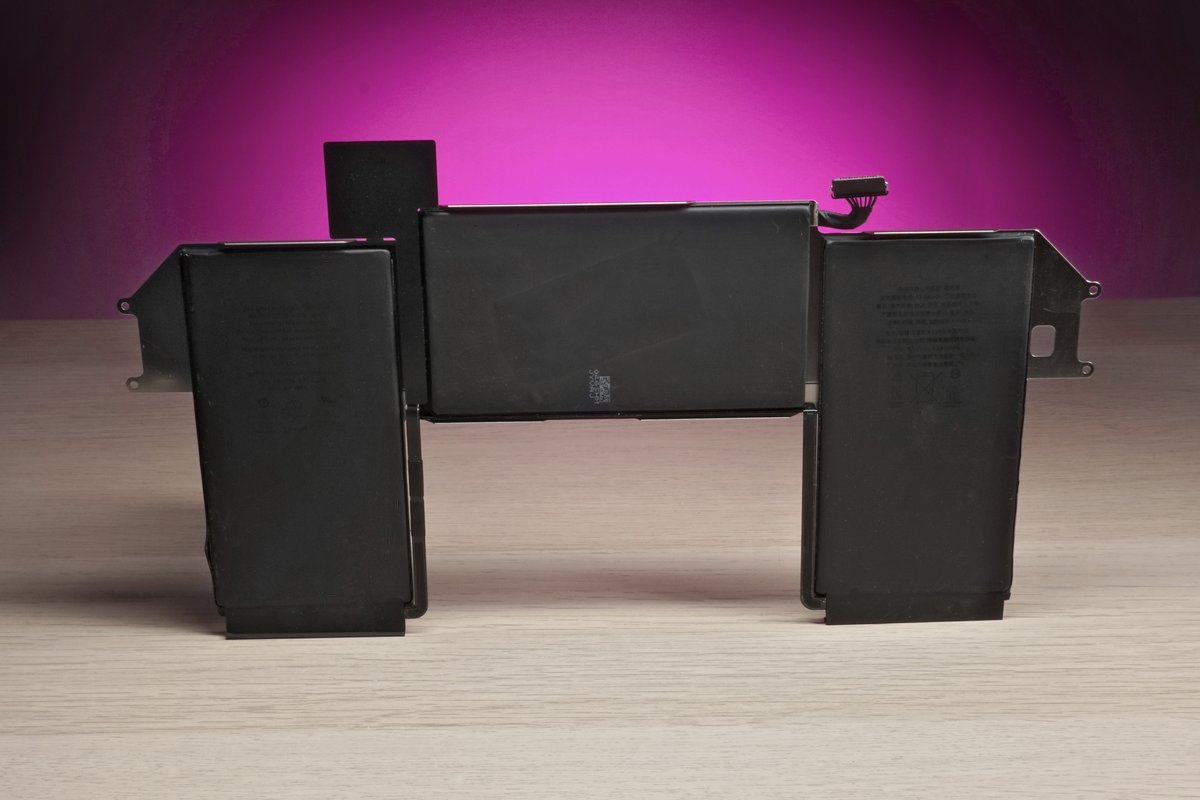
This is the key difference between going to Apple and coming to us.
When you take a MacBook to Apple for a “battery service,” they don’t just replace the battery. They replace the entire top case assembly. That includes the battery, keyboard, trackpad, speakers, and the aluminium housing they’re all attached to. You get a new battery, but you also get a new everything-else-in-the-top-half, and you pay accordingly.
We replace just the battery. The keyboard, trackpad, and housing stay as they are (assuming they’re working fine). This keeps the cost significantly lower while giving you exactly the same result: a MacBook with a new battery that lasts all day again.
Apple does it this way partly because the battery is adhesive-bonded to the top case, making it harder to separate without the right tools and experience. We have both, which is why we can do the battery-only replacement that Apple won’t.
Battery Quality: What Goes Into Your MacBook
Not all replacement batteries are equal. The market is full of cheap cells that look right but don’t perform. Here’s what separates a quality replacement from a bad one.
Cell quality. Good replacement batteries use cells from manufacturers like Sony, Samsung, or LG. Cheap batteries use generic cells that hold less charge, degrade faster, and in some cases can swell or overheat. We use batteries with reputable cells because fitting a cheap battery that fails in six months is a waste of everyone’s time.
Capacity matching. A quality replacement matches or exceeds the original battery’s milliamp-hour (mAh) rating. Cheap batteries often have lower actual capacity than advertised. We verify the specification before fitting.
Safety circuitry. Lithium-ion batteries need proper protection circuitry to prevent overcharging, over-discharging, and short circuits. Cheap batteries cut corners on this. Good ones don’t.
Every battery we fit comes with a warranty. If it develops a fault or doesn’t hold charge as it should, bring it back and we’ll sort it.
MacBook Models We Replace Batteries On
MacBook Air (2018 onwards). All Retina models through to the latest Apple Silicon versions. The most common battery replacement we do.
MacBook Pro 13″, 14″, 16″. All Touch Bar models (2016-2019), all Apple Silicon models (M1, M2, M3, M4). The 16″ models have larger batteries that take slightly longer to replace. The 2016-2019 Touch Bar models are particularly common in our workshop because those batteries were worked hard by the Touch Bar drawing power constantly.
Older MacBook Pro and Air (pre-2018). We replace batteries on older models too, though parts availability varies. The older models with removable batteries (pre-2012) are the simplest replacements. Post-2012 models have adhesive-bonded batteries that need careful removal with the right tools and solvents. We’ve done hundreds of these.
Which MacBooks can’t have batteries replaced? Every MacBook can have its battery replaced. Unlike RAM on newer models (which is soldered permanently), the battery is always a replaceable component. Some models are harder to access than others, but none are impossible.
For screen, keyboard, or liquid damage issues alongside battery replacement, we handle those too.
Maintaining Your New Battery
Don’t leave it plugged in permanently. Modern MacBooks manage charging intelligently, but keeping your battery at 100% constantly isn’t ideal for longevity. Unplug it occasionally and let it run down to 20-30% before recharging.
Avoid heat. Don’t leave your MacBook in a hot car or in direct sunlight. Don’t block the air vents by using it on a bed or cushion. Heat accelerates battery degradation faster than anything else.
Keep macOS updated. Apple releases battery management improvements regularly. Those update notifications are genuinely helping your battery last longer.
Watch your apps. Close programs you’re not using, especially anything constantly syncing in the background. Chrome is particularly notorious for battery drain. Keep an eye on Activity Monitor if your battery seems to drain faster than it should.
Monitor your battery health. Check System Settings > Battery periodically. If maximum capacity drops below 80% or you see “Service Recommended,” it’s time for another replacement. Don’t wait until the battery is completely dead or swollen. Catching it early means a straightforward swap rather than an emergency repair with potential damage to other components.
Battery dying on you? Drap it in for a free battery health check. Nae appointment needed.
Call Us