

MacBook Trackpad Replacement Dundee
MacBook trackpad clicking on its own? Not responding? Cursor jumping around? We replace and repair trackpads on all MacBook models at our Perth Road workshop. Precise calibration and proper Apple-quality parts.
 Google Reviews


Your MacBook trackpad won’t click, the cursor jumps around the screen, or it registers phantom clicks in the middle of your work. Before you assume you need a new trackpad, the problem might not be the trackpad at all. The single most common cause of trackpad click failure is a swollen battery pushing up from underneath.
We diagnose the actual cause before replacing anything. If it’s the battery, we replace the battery. If it’s the trackpad, we replace the trackpad. Either way, we fix it at our Perth Road workshop in Dundee without the Apple Store price tag.

Common MacBook Trackpad Problems
Won’t click or clicks weakly. You press down and nothing registers, or you have to press much harder than normal. This is the most common symptom and it’s usually caused by a swollen battery rather than a faulty trackpad.
Dead zones. Certain areas of the trackpad don’t respond to touch at all while others work fine. Usually indicates a fault in the trackpad’s pressure sensor array.
Cursor jumping or phantom clicks. The cursor shoots across the screen on its own or registers clicks you didn’t make. Can be a faulty trackpad, liquid damage corrosion on the ribbon cable, or a software issue.
Multi-touch gestures not working. Pinch-to-zoom, two-finger scrolling, or three-finger swipe stopped responding. Sometimes software (check System Settings > Trackpad), sometimes the touch surface layer has failed.
Physical damage. Cracks in the glass surface, the trackpad sitting unevenly in its housing, or visible water damage. These need hardware replacement.
Trackpad bulging upwards. This is a swollen battery. Stop using your MacBook immediately and bring it in. It’s a safety risk.
Swollen Battery: The #1 Cause of Trackpad Click Failure
This is the most important thing on this page, and it’s what most trackpad repair pages don’t tell you.
The battery in your MacBook sits directly underneath the trackpad. When a battery swells (gas building up inside from degraded chemistry), it pushes upward against the trackpad from below. Modern Force Touch trackpads rely on precise pressure calibration to detect your clicks. A swollen battery disrupts that calibration, making the click feel weak, delayed, or completely unresponsive.
Replacing the trackpad alone will NOT fix this. The new trackpad will have the same problem because the swollen battery is still pushing against it. The fix is a battery replacement. Once the battery is replaced, the trackpad usually works perfectly again without being touched.
How to tell: if the bottom of your MacBook isn’t sitting flat on the desk, the trackpad area feels raised compared to the surrounding case, or the keyboard keys in the middle feel slightly different, that’s battery swelling. With the bottom case removed, the trackpad typically works normally because the pressure from the battery is relieved.
We check for battery swelling as the first step in any trackpad diagnosis. If the battery is the problem, we’ll tell you before replacing a trackpad you don’t need.
How Force Touch Trackpads Work
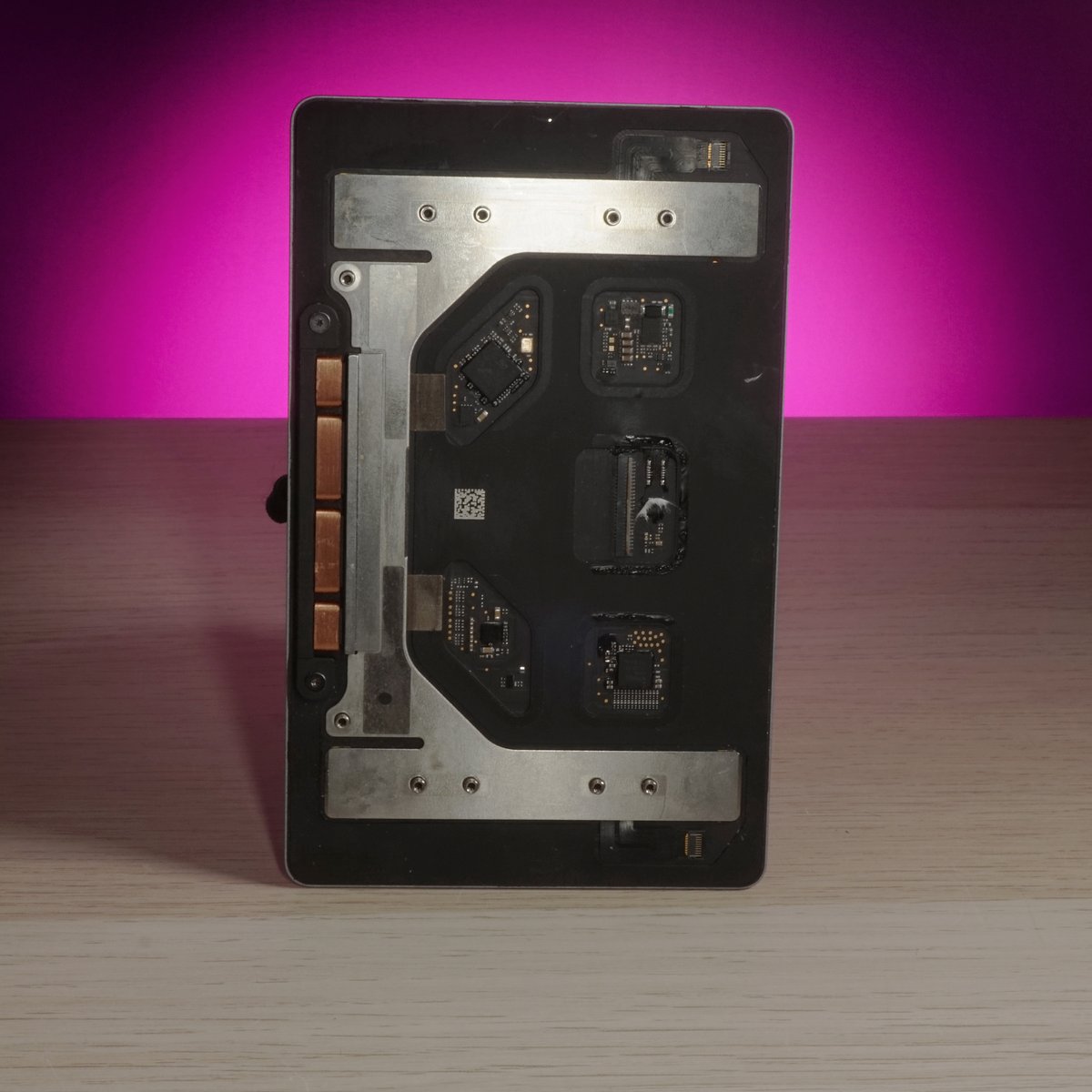
Modern MacBook trackpads (2015 onwards) don’t mechanically click. There’s no physical button underneath. Instead, they use a system called Force Touch that combines pressure sensors with a Taptic Engine (a small haptic motor) to simulate the feeling of a click.
When you press the trackpad, pressure sensors detect how hard you’re pressing. The Taptic Engine then vibrates in a specific pattern that feels exactly like a physical click. It’s convincing enough that most folk don’t realise it’s not a real mechanical click until someone tells them.
This matters for diagnosis because Force Touch failures are different from old mechanical trackpad failures:
- Taptic Engine failure: the trackpad detects your touch and moves the cursor, but pressing down produces no click sensation. The motor has failed.
- Pressure sensor failure: the trackpad doesn’t register how hard you’re pressing, so clicks don’t work even though the surface responds to light touch.
- Cable failure: the ribbon cable connecting the trackpad to the logic board has corroded or disconnected. Especially common after liquid spills.
Without power, a Force Touch trackpad won’t click at all. This is normal. If your MacBook’s battery is completely dead and it’s running on charger power that isn’t reaching the trackpad circuit, the click won’t work even though the trackpad surface might still move the cursor. This catches folk out because they think the trackpad has failed when it’s actually a power delivery problem. We test for this during diagnosis.
The Force Touch trackpad is one of the more complex components in a MacBook. It integrates pressure detection, haptic feedback, and multi-touch gesture recognition into a single glass surface. When it works, it’s brilliant. When it fails, diagnosing which specific component has failed requires experience and the right diagnostic approach.
Software Fixes to Try First
Before bringing your MacBook in, these quick checks might fix the problem without any hardware work:
Check your settings. System Settings > Trackpad. Make sure “Force Click and haptic feedback” is ticked. Check that “Click” pressure is set where you want it (Light, Medium, or Firm). Sometimes a macOS update resets these.
Reset the SMC. The System Management Controller handles trackpad power delivery. On Intel MacBooks, shut down, then hold Control + Option + Shift + Power for 10 seconds. On Apple Silicon MacBooks, shut down and wait 30 seconds, then restart. This fixes some trackpad responsiveness issues.
Reset NVRAM. The non-volatile memory on your Mac stores low-level hardware settings including some trackpad parameters. On Intel MacBooks, shut down, then power on and immediately hold Option + Command + P + R for about 20 seconds until you hear the startup chime twice (or see the Apple logo appear and disappear twice). Apple Silicon MacBooks reset NVRAM automatically on each startup, so there’s nae manual reset needed there. It’s worth trying on older Intel machines if the SMC reset didn’t help.
Boot into safe mode. Safe mode loads only the essential parts of macOS and disables third-party software. Hold Shift at startup (Intel) or hold the power button until you see startup options, then hold Shift and click Continue (Apple Silicon). If the trackpad works normally in safe mode but not in normal mode, a third-party app or extension is causing interference. A login item or kernel extension is the usual culprit.
Check for Bluetooth interference. If you’ve got a Bluetooth mouse or external trackpad paired to your MacBook, macOS sometimes gets confused about which device is controlling the cursor. Go to System Settings > Bluetooth and temporarily disconnect any paired pointing devices. Bluetooth accessories from other folk’s computers can occasionally cause phantom cursor movement if they’re within range, especially in a busy office or cafe.
If none of these fix it, the problem is hardware and it needs hands-on diagnosis.
When Hardware Replacement Is Needed
Cracked or damaged glass surface. The trackpad glass can’t be repaired. The whole assembly gets replaced.
Failed Taptic Engine. Cursor works but clicks produce no haptic feedback. The motor inside the trackpad has failed. Full trackpad replacement.
Liquid damage corrosion. Water or other liquid has corroded the trackpad’s internal components or its ribbon cable. We clean what we can, but often the trackpad assembly needs replacing after liquid damage. For broader liquid damage, see our MacBook liquid damage repair page.
Physical impact damage. A dropped MacBook or a heavy knock to the palm rest area can crack the pressure sensor array inside the trackpad, even when the glass surface looks fine from above. The glass might be completely intact, but the internal force-sensing layer can fracture. You’ll typically see dead zones on one side, or the trackpad will click on one edge but not the other. That pattern points straight to physical damage below the surface rather than a software or battery issue.
Sensor degradation over time. Force Touch pressure sensors don’t last forever. On MacBooks that are four or more years old and have had heavy daily use, the sensors can drift out of their calibrated range to the point where no software fix or SMC reset will bring them back. The trackpad might still detect light touch fine but lose its ability to distinguish between a tap, a light click, and a Force Click. This gradual degradation is different from a sudden failure and often gets misread as a software problem. Once the sensors are past the point of calibration, replacement is the only fix.
A creative professional’s MacBook Pro came in with the trackpad registering phantom clicks mid-project. She was losing work every time the cursor jumped. We diagnosed a faulty Force Touch sensor, replaced the full trackpad assembly, and calibrated it perfectly. Had it back in her hands next day, working exactly as it should.

Trackpad playing up? Drap it in and we’ll check whether it’s the trackpad or the battery. Nae appointment needed.
Call UsOur Replacement Process
Step one: check the battery. Before touching the trackpad, we check for battery swelling. If the battery is pushing the trackpad up, that’s the fix, not a trackpad replacement.
Step two: diagnose the trackpad. We test the pressure sensors, Taptic Engine, ribbon cable connection, and touch surface. We identify exactly which component has failed so we replace only what’s needed.
Step three: replace and calibrate. We fit the new trackpad assembly, reconnect all cables, and calibrate the Force Touch sensitivity. We test every gesture (click, Force Click, two-finger scroll, pinch, swipe) across the entire surface to make sure there are no dead zones or inconsistencies.
Calibration is worth explaining properly because it’s not just switching the part and calling it done. Force Touch trackpads have four corner sensors that need to be balanced against each other so the click threshold feels identical whether you press top-left, bottom-right, or dead centre. If the sensors are out of balance, the click feels different depending on where on the surface you press. We go through a set of pressure tests at each corner and along each edge, then fine-tune the click threshold in the firmware settings until the response is uniform across the whole surface. We also confirm the haptic feedback pattern is correct. A new assembly fitted without proper calibration will feel off, and folk notice immediately.
Before handing the MacBook back, we run a full multi-touch test covering all the gestures macOS supports: single-finger click, two-finger right-click, two-finger scroll, three-finger drag (if enabled), pinch-to-zoom, rotate, and Force Click. If anything is even slightly inconsistent, it goes back on the bench.
Top Case vs Trackpad-Only Replacement
Same story as keyboard and battery replacement. Apple replaces the entire top case assembly (trackpad, keyboard, battery, speakers, housing) for a trackpad issue. You get a new trackpad, but also a new everything else, and the bill reflects that.
We replace just the trackpad. Your keyboard, battery, and housing stay as they are. Same functional result, significantly lower cost. Apple does the full top case because the trackpad is integrated into the housing, but we have the tools and experience to do the trackpad-only swap.
There’s a reason Apple designs it this way. On newer MacBook Pros especially, the trackpad flex cable routes under the battery cells and connects to a board that sits underneath the keyboard layer. Apple’s position is that separating these components in the field creates too many opportunities for damage, so their authorised process is to swap the whole lot. It keeps their repair times short and their liability low.
For the customer though, that approach means paying for a new keyboard you dinnae need, a new battery that might still have decent capacity, and a new housing that’s perfectly fine. The only thing that’s actually faulty is the trackpad. We carry the specialist tools to safely remove the trackpad from the housing, replace only the assembly that’s failed, and reassemble without disturbing anything else. If your keyboard and battery are both in good nick, there’s no reason to replace them. The saving over an Apple top case repair is usually meaningful.
Where the full top case replacement does make sense is when multiple things are failing at once. If the trackpad is gone, the keyboard has sticky keys, and the battery is under 80% health, the maths changes. We’ll always tell you honestly which option gives you better value for your specific machine.
MacBook Models We Service
MacBook Air (2018 and later). The MacBook Air moved to Force Touch with the 2018 redesign. Models from 2018 through to the current M-series Air all use Force Touch trackpads, though the size and connector type changed across generations. The M1 Air (2020) and M2 Air (2022) have larger trackpads than their Intel predecessors. Parts availability is good across all these models.
MacBook Pro 13-inch (2015 and later). The 13-inch Pro was one of the first MacBooks to get Force Touch, introduced in early 2015. The 2016 to 2019 models with the Touch Bar are the ones we see most often for trackpad issues because they’re now several years old and the batteries in those machines are well past their service life. A swollen battery in a 2017 or 2018 MacBook Pro 13-inch causing trackpad click failure is one of our most common jobs.
MacBook Pro 15-inch and 16-inch. The 15-inch Pro got Force Touch in mid-2015. These have larger trackpad assemblies than the 13-inch and the replacement process is slightly different. The 16-inch model (2019 onwards) has an even larger trackpad surface. Parts for these are available and we carry stock of the most common sizes.
MacBook Pro 14-inch and 16-inch M-series (2021 and later). The redesigned M-series Pros have a noticeably bigger trackpad than any previous MacBook. These are newer machines so we see fewer trackpad failures in them, but liquid damage and physical impact do still happen. Parts are available for these.
Older mechanical trackpads (pre-2015). The earlier MacBooks with a physical clicking mechanism underneath. These are simpler to replace because the click mechanism is a real physical button rather than a haptic simulation. Parts are generally still available for most models. If your older MacBook’s trackpad has gone mushy, stopped clicking, or developed dead zones, we can sort it. These older trackpads also suffer from battery swelling issues because the battery still sits underneath them.
For screen, keyboard, or charging port issues alongside trackpad problems, we handle those too.
What to Expect
Walk in. 153 Perth Road, Dundee. No appointment needed.
We diagnose. Battery check first, then trackpad testing. We tell you exactly what’s wrong and what the fix involves. Clear quote before we start.
We fix and test. Same-day when parts are in stock. Every gesture tested across the full trackpad surface before you collect. Your data is completely untouched.
On same-day jobs, most folk drop the MacBook off in the morning and collect in the afternoon. We’ll give you a realistic time estimate when you drop it in. If a part needs ordering, we’ll tell you upfront and give you an expected turnaround date. We don’t sit on machines waiting for parts to arrive without keeping you updated.
Your data is never at risk during a trackpad replacement. The job doesn’t require the storage to be touched, wiped, or even accessed. We don’t need your password. The repair is entirely mechanical and the only software step is calibrating the Force Touch settings, which doesn’t touch your files or accounts. That said, we always recommend folk have a recent backup before any hardware repair, just as a general habit.
Warranty: every trackpad replacement comes with a warranty on parts and labour.
Trackpad gubbed? Gee’z a shout. We’ll diagnose the real cause before replacing anything.
Call Us