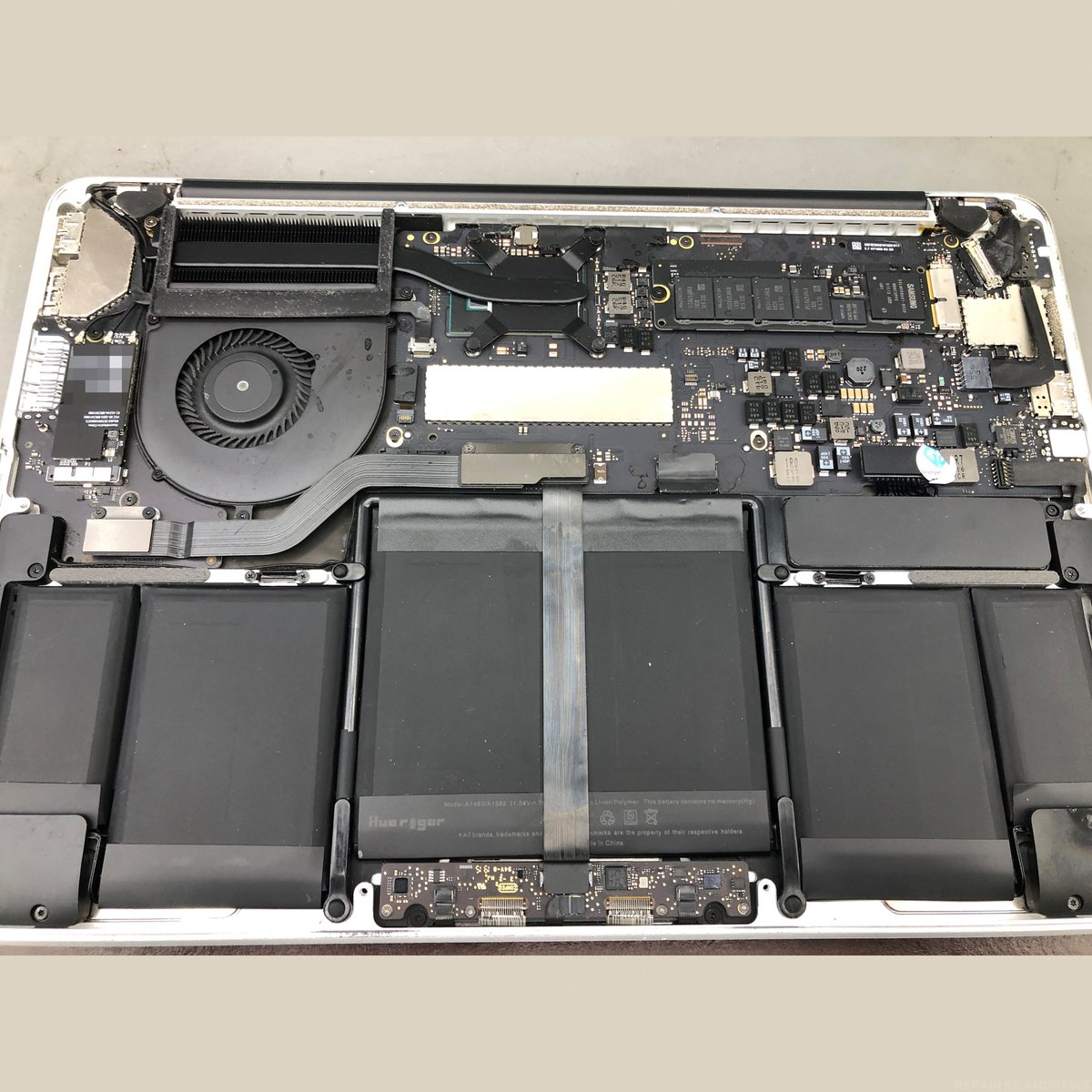
Spilled something on your MacBook? Dinnae panic – but dinnae turn it on either. The faster you get it to us, the better your chances. We strip, clean, and repair liquid-damaged MacBooks at our Perth Road workshop. Ultrasonic cleaning, component-level repair, and we fight to save every file.
Brilliant service, was kind enough to repair my phone free of charge.
Katy Huse
6 months ago
★★★★★
Got a broken screen on my iPad mini 6 fixed. Repair took 2 days and iPad looks great.
Blanche Bizzell
6 months ago
★★★★★
Really appreciate the service they gave me. My phone was dead and I was stressed! They fixed it fast and I didn't lose any data.
Harry Mitchell
6 months ago
★★★★★
Used these guys for an iPhone battery replacement. Repair was done on time and price was fair.
Scottie Scott
6 months ago
★★★★★
Living locally these guys are a godsend. Saves me going all the way into the city centre when I need something fixed. Used them for an iPhone battery and they were quick and decent priced.
Bobby Bailey
7 months ago
★★★★★
Great service from Ian. He managed to fix my Macbook super quick.Thought it was for the bin but he worked his wonders.
LESLIE GRACIELA FARFÁN CARRASCO
6 months ago
★★★★★
I am studying at the university and not knowing the local area i did my research online. Found this place and they looked really professional. Needed my Macbook fixed and was worried i would lose my data. Turned up at the shop and was really impressed by the setup. The guy working there was very helpful and fixed my Mac the same day. I will deffinitely be back if I have any other problems.
Leah Rogers
6 months ago
★★★★★
My iPhone 13 battery was dying by half way thru the day and it was doing my head in. Got it replaced here in about an hour while I went and grabbed a coffee. Phones been solid ever since, back to lasting a full day no bother. Would use them again 100%
Kirsty Flett
6 months ago
★★★★★
Popped in with my broken phone, the team explained what I had broken and what would need to be replaced.
Explained the use of genuine parts, correct model and colour matching.
Parts took a day longer to arrive, but there was a storm so yknow, these things happen, popped in when parts arrived with phone, an hour later it was ready for collection.
Looks better than new!
Excellent, good quality and friendly service, highly recommended!
Gail Stirling
8 months ago
★★★★★
Brilliant service today from Ian! Thank you for reassurance and speedy repair and thorough software check.
If you’re reading this page, there’s a good chance you’ve just spilled something on your MacBook or dropped it in water and you’re currently panicking.
If you take a deep breath, here’s something that you might find helpful: almost four-fifths of MacBook liquid damage cases can be successfully repaired when they’re brought in within 24 hours. So if you’ve just knocked over your morning coffee or had an unfortunate encounter with a pint down the pub, don’t panic- and whatever you do, don’t try that old “rice trick” you’ve probably heard about.
MacBook Pro liquid damage repair at Repair Alliance Dundee
At Repair Alliance, we specialise in MacBook liquid damage repair in Dundee, and we offer professional micro-soldering and logic board cleaning that even the Apple Store often can’t (or won’t) provide. Apple might quote you. See our logic board repair page for more on board-level work. Apple might quote you £600+ for a complete logic board replacement, but our expert technicians can often repair your MacBook Pro or MacBook Air’s board for a fraction of that cost.
Whether you’re a student at Abertay University, the University of Dundee or Dundee and Angus College that needs your MacBook fixed to meet a course deadline or whether you’re a professional who relies on your MacBook, we understand the urgency.
This page will cover what happens when liquid hits your MacBook, why immediate action matters- and how our proven repair process can save both your device and your data.
Inside a MacBook Pro during liquid damage assessment. The logic board (top) and battery (bottom) are both at risk from spills.
What Happens When Liquid Hits Your MacBook? (The Critical First 24 Hours)
When liquid gets into your laptop, it doesn’t just sit there politely- it starts causing problems immediately. Think of it like water getting into your car engine- the longer you leave it, the more damage it does.
Why Time is Everything in Liquid Damage Repair
Liquid damage isn’t solely concerned with the initial spill. The real problems start in the hours after the incident. When liquid hits the delicate components inside your MacBook, it starts corrosion– basically your logic board slowly eating itself away.
Corrosion is ongoing. We’ve seen MacBooks come in after just a few hours where the damage is minimal and easily repairable. But devices brought in after a week or two often have corrosion spread so far that even our skilled technicians can’t bring them back to life.
It’s not the water that causes the damage- it’s whatever’s dissolved in it. And even as the water slowly dries, it leaves behind that damp residue that gets more concentrated and causes more ongoing damage.
Statistics don’t lie- while 78% of liquid damage cases are repairable within 24 hours, that drops to around 40% after three days, and by a week, you’re looking at maybe a 15% to 20% success rate. So if you’re reading this with a wet MacBook sitting next to you, stop reading and bring it in now.
Common Liquid Damage Scenarios in Dundee
We tend to see predictable patterns with MacBook liquid damage. The morning coffee spill (or tea, or whatever) is the number one culprit- usually when someone’s rushing to work or university. Then there’s the “working in a café” scenario- Dundee’s got lovely coffee shops, but mixing laptops with beverages in busy spaces is risky.
Water damage is another big one, especially during Scotland’s unpredictable weather. Sometimes it’s a leaky bag during a downpour, other times it’s condensation when someone brings their cold MacBook into a warm room too quickly.
The Type of Liquid Makes a Difference
Plain water is the least harmful. It causes corrosion through the minerals dissolved in it, but if cleaned quickly, the damage is often minimal and fully repairable.
Coffee and tea are worse because they leave sticky residue behind as the liquid dries. That residue sits on the circuit board and continues causing corrosion even after the water has evaporated. Milk makes it worse again because dairy fats coat components.
Beer, wine, and fizzy drinks are the worst. They’re acidic, sugary, and leave the heaviest residue. These cause the fastest and most aggressive corrosion. If you’ve spilled beer or Coke on your MacBook, time matters even more than usual.
Whatever the liquid, the repair approach is the same: get it to us as quickly as possible. But knowing what was spilled helps us assess how much damage to expect and how urgently the board needs cleaning.
Spilled something on your MacBook? Dinnae wait. Every minute counts. Bring it in now.
Power off immediately. Hold the power button for five seconds until it shuts down. Don’t try to save your work. Don’t click “Shut Down” from the menu. Just hold the button.
Unplug the charger. If it’s plugged in, disconnect it. You want zero electricity flowing through wet components.
Flip it upside down. Open the lid to about 90 degrees and flip the whole thing upside down so it sits like an inverted V. This lets excess liquid drain out through the keyboard rather than flowing deeper into the machine.
Absorb what you can. Use a towel or paper towels to soak up any liquid on the outside. Don’t shake it.
Bring it to us. Don’t wait 48 hours to see if it dries out. Don’t put it in rice. The sooner we open it up and clean the board, the better your chances.
What NOT to Do… and How to Avoid Further Damage
Do NOT use a hairdryer or heat source to dry your MacBook. Heat can warp components and push liquid deeper inside.
Forget about the infamous rice trick– it doesn’t work, and while your MacBook sits in rice for 48 hours, corrosion is having a field day with your logic board.
Don’t try to turn it on. Apple’s own advice is the same: power off immediately. Don’t try to turn it on “just to see if it still works.” Powering up can cause short circuits and turn a simple repair into an expensive problem.
Here’s what you should do: turn it off immediately, unplug everything, flip it upside down so excess liquid can drain out, and get it to us as quickly as possible.
Don’t Put It In Rice
We said this above… we’ll say it again! The “rice trick” doesn’t work- even though it absorbs water, it leaves more behind to cause damage.
And even when the water is slowly absorbed, it leaves behind the damp residue of substances dissolved in the water. It’s these substances that cause the real damage. They’ll still be there, corroding your MacBook, even as the water evaporates.
Corroded MacBook logic board before professional cleaning at Repair Alliance Dundee
Professional MacBook Liquid Damage Repair Process
Initial Assessment and Diagnostic
When you visit our shop at 153 Perth Rd with your liquid-damaged MacBook, we do a complete assessment. We’ll ask about the incident- what type of liquid, how much, how long ago- then carefully open up your MacBook and inspect the internal components. Once we’ve completed the diagnostic, we’ll give you a detailed explanation of what we’ve found, show you any visible damage, and give you an honest assessment of repair chances.
There are no surprises, no hidden costs.
Micro-Soldering and Logic Board Cleaning
This is where we differ from other repair shops. Most places will tell you a liquid-damaged logic board needs replacing entirely. That’s because they don’t have the skills or equipment to fix it– many of them are simply “parts swappers”.
Our technicians are different. For keyboard or trackpad damage from spills, we handle those alongside the logic board. Our technicians are different, because they’re trained in micro-soldering, working on components literally smaller than a grain of rice.
We use specialised ultrasonic cleaning equipment and professional-grade solvents to remove all traces of liquid and corrosion. We remove components, clean them individually, clean the board itself, then carefully reassemble everything.
From Our Workshop
An Abertay student spilled a full cup of tea over her MacBook Pro the night before a deadline. She brought it in first thing the next morning, panicking. We stripped it down completely, ultrasonic cleaned the logic board, and replaced a damaged power circuit component. Had it running again in 48 hours with all her files intact. She submitted her coursework on time.
Component Testing and Replacement
We test everything systematically- CPU, RAM, storage controller, charging circuits, display connections, USB ports, Wi-Fi module… etcetera. If we find components that can’t be saved, we can often source and replace individual chips rather than the entire logic board, saving you hundreds of pounds.
Water-damaged MacBook Pro logic board showing corrosion before repair
Warning: Your MacBook Might Work Fine After a Spill
This is the trap that catches a lot of folk. You spill water on your MacBook, follow the advice to let it dry, turn it back on after a couple of days, and everything seems fine. You think you got away with it.
Then two weeks later, your MacBook starts behaving strangely. Charging becomes intermittent. The trackpad stops clicking. You get a PPP007 error code. Or it just dies one morning and won’t turn on.
This is delayed corrosion failure. The initial water might have evaporated, but the minerals and contaminants it left behind are still sitting on the circuit board, slowly corroding traces and component leads. By the time symptoms appear, the damage is much worse than it would have been if the board had been cleaned immediately after the spill.
If you’ve spilled liquid on your MacBook and it seems fine afterwards, we’d still recommend getting it checked. A quick inspection and preventative clean costs far less than a logic board repair after corrosion has had weeks to spread.
Quality Assurance and Warranty
Before we hand your MacBook back, we run full diagnostics on every system. We back our work with a proper warranty covering both the work we’ve done and any components we’ve replaced.
MacBook got soaked? Gee’z a shout. The faster you bring it in, the better your chances.
Apple’s repair philosophy is straightforward- they don’t do component-level repairs. Any liquid damage detected means complete logic board replacement. Apple Stores aren’t really repair centres- they’re retail outlets with basic repair capabilities.
When you spill coffee on your MacBook Pro and take it to Apple, they’ll quote you £400 to £800- or more!- for a new logic board, plus labour. They still can’t always guarantee this will fix all issues either.
Instead of throwing away a logic board with one or two damaged components, we actually fix those components. For battery damage from liquid spills, we handle that too. Where Apple might charge several hundred pounds, we can often sort the same problem for significantly less. That’s real money back in your pocket, often with faster turnaround too.
MacBook Models We Repair in Dundee
We work on pretty much every MacBook model, from vintage PowerBooks- yes, that far back!- right up to the latest MacBook Pro models with M-series chips.
MacBook Pros are our most common liquid damage repairs. Older models (2012 and earlier) are quite forgiving- more space inside and easier to clean. Newer models (2016 onwards) are trickier but definitely not impossible. Our micro-soldering skills really come into their own with these compact models.
MacBook Airs are generally quite reliable. Older models (2010-2017) are great to work on- plenty of space and straightforward disassembly! Newer models (2018 onwards) are more challenging but definitely doable. Their keyboard design often provides good drainage, saving many from serious damage.
For vintage MacBooks (2010 and earlier), liquid damage repair is often straightforward with larger, easier-to-work-with components. For the newest M1, M2, and M3 MacBooks, repair is definitely possible but requires our most advanced techniques.
The key thing with any MacBook is getting to us quickly. That 24-hour window applies to all models- liquid doesn’t discriminate based on age.
// FAQ
MacBook Liquid Damage Repair Questions
What should I do if I’ve just spilled liquid on my MacBook?
Power it off immediately (hold the power button for 5 seconds), unplug the charger, flip it upside down to let liquid drain, and bring it to us as fast as you can. Don’t try to turn it on, don’t use a hairdryer, and don’t put it in rice.
Does putting a MacBook in rice actually work?
No. Rice absorbs some surface moisture but doesn’t stop corrosion. While your MacBook sits in rice, the minerals and contaminants from the liquid are corroding the circuit board. Rice grains and starch dust can also get inside the ports and cause additional problems. Get it to a professional instead.
How quickly do I need to bring it in?
As soon as possible. Corrosion starts within hours of the spill. The majority of liquid damage cases are repairable within the first 24 hours. After three days, the success rate drops significantly. After a week, the chances are much lower. Every hour counts.
My MacBook works fine after a spill. Should I still get it checked?
Aye, strongly recommended. Liquid damage often causes delayed failure. Your MacBook might work for days or weeks after a spill, then start developing problems as corrosion silently spreads. A preventative clean costs far less than repairing damage that’s had weeks to get worse.
Does the type of liquid matter?
Aye. Plain water is the least harmful. Coffee and tea leave sticky residue. Beer, wine, and fizzy drinks are the worst because they’re acidic and sugary, causing faster and more aggressive corrosion. Whatever the liquid, get it to us quickly.
Why is your repair cheaper than Apple’s?
Apple doesn’t repair liquid-damaged logic boards. They replace the entire board, which costs hundreds of pounds. We do component-level repair: ultrasonic cleaning, corrosion removal, and replacement of individual damaged components. Same functional result, fraction of the cost.
How long does liquid damage repair take?
Ultrasonic cleaning takes a day. If components need replacing after cleaning, add another one to three days for diagnosis and micro-soldering. We’ll give you a realistic timeframe after the initial assessment.
Can you recover my data from a liquid-damaged MacBook?
In most cases, aye. Your data is stored on the SSD, which is often unaffected by liquid damage. Even if the logic board is beyond repair, we can usually recover your files. See our data recovery service for more detail.
Which MacBook models can you repair liquid damage on?
All of them. MacBook Pro and MacBook Air from every generation, including the latest Apple Silicon models. Older models (pre-2016) are generally easier to work on because there’s more space inside. Newer models are more compact but definitely repairable with the right equipment and experience.
Do your liquid damage repairs come with a warranty?
Aye. Every repair comes with a warranty covering our workmanship and any components we’ve replaced. If something we fixed develops a problem, bring it back and we’ll sort it.
Spilled on Your MacBook? Dinnae Wait.
The faster you bring it in, the better the chances. Every minute counts with liquid damage.
We use cookies to improve your experience on our website. Essential cookies help the site function properly. Non-essential cookies help us understand how you use the site.


 Google Reviews