

Nintendo Switch Repair Dundee
Switch playing up? We repair Nintendo Switch, Switch Lite, Switch OLED and Switch 2 at our Perth Road workshop. Joy-Con drift, screen damage, charging port, docking issues and more.
 Google Reviews


Common Switch Problems
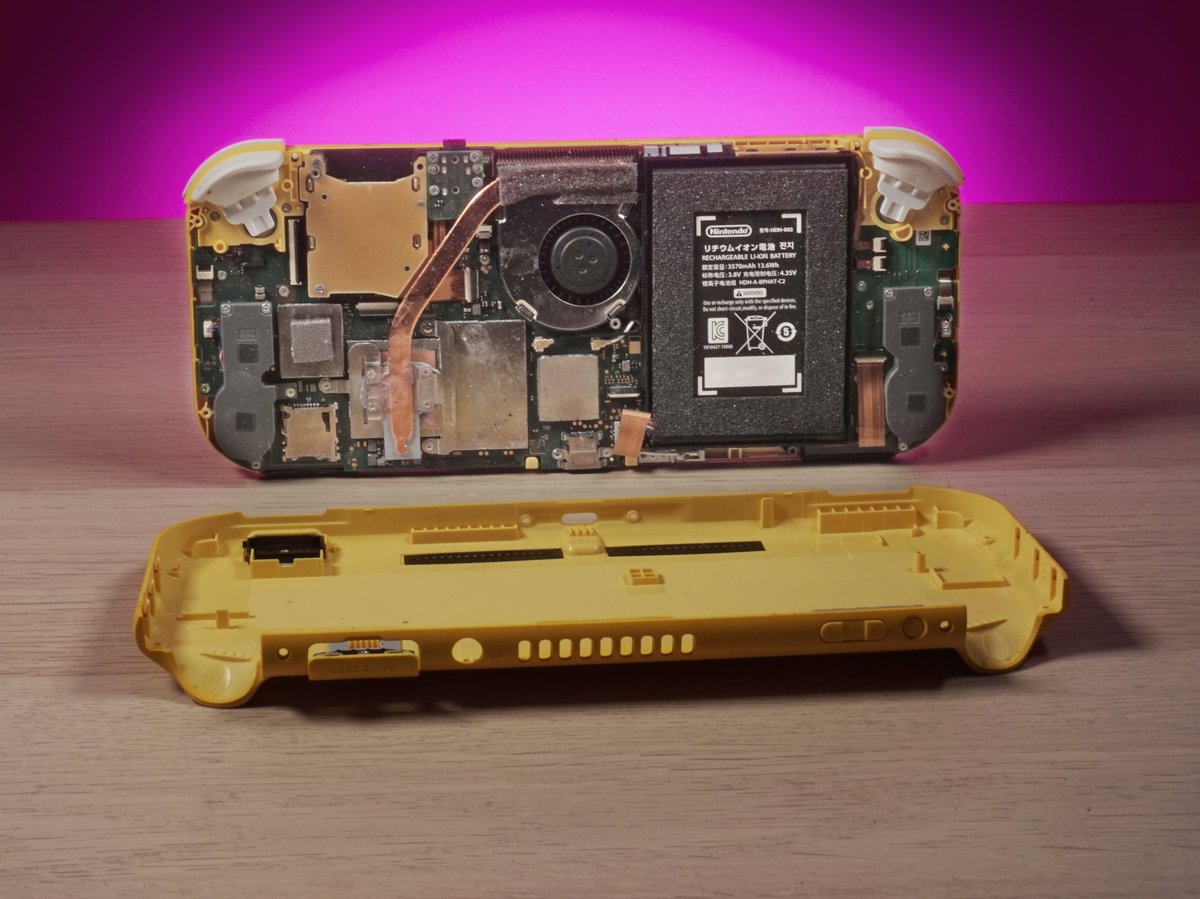
The Nintendo Switch is a brilliant console, but it wasn’t built to survive everything that gets thrown at it. Kids drop them. Joy-Cons wear out. Charging ports get mangled. We see Switches come through the shop every week, and after years of repairing them, certain faults come up again and again.
Here’s what we deal with most often:
Joy-Con drift is the single most common Switch fault we see. The analogue stick starts registering movement when nobody is touching it. Your character walks on their own. Menus scroll by themselves. It happens because the graphite contact pad inside the stick module wears down over time, and it affects almost every Joy-Con eventually. Nintendo offers free Joy-Con drift repair in the UK, but the turnaround is up to 10 working days and the fix often drifts again. We can replace the stick module same day. More on this below.
Cracked or damaged screens are the second most common issue. The Switch screen sits completely exposed, unlike a DS or 3DS that folds shut. One drop onto a hard floor and you’ve got a crack running across the display. Sometimes the LCD or OLED panel underneath breaks too, giving you dead pixels, colour bleed, or a completely black screen even though the console is still running.
Charging port failure happens a lot, especially on consoles used by younger kids. The USB-C port on the bottom takes a battering from cables being jammed in at angles, yanked out sideways, or just plain worn out from daily use. When the port fails, the Switch won’t charge, won’t connect to the dock, or both.
Docking issues cover everything from “my Switch won’t display on the TV” to “the dock doesn’t recognise the console at all.” This can be the dock itself, the Switch’s USB-C port, the HDMI cable, or a software glitch. We test all the components to find out exactly where the problem sits.
Game card slot problems show up as the console not reading physical games, or only reading them if you hold the cartridge at a specific angle. Dust, bent pins, or a damaged card reader module are the usual causes.
Battery degradation is something we see on older Switches. The original model launched in 2017, so plenty of them are running on batteries that have had thousands of charge cycles. A healthy Switch gets roughly 4 to 9 hours depending on the game. If yours is dying after an hour or two, the battery cell has degraded and needs replacing.
Fan and overheating issues cause the console to get unusually hot, shut itself down mid-game, or run with the fan screaming at full speed constantly. Dust buildup inside the console is the most common cause. A blocked air intake or failing fan motor will push temperatures up until the Switch throttles itself or shuts down to protect the processor.
Software issues like freezing, crashing, or failing to boot can sometimes be fixed without opening the console at all. A corrupted SD card, a failed system update, or corrupted game data can all cause problems that look like hardware faults but aren’t. We always check for software causes before recommending a hardware repair.
Joy-Con Drift Repair
If you own a Nintendo Switch, you almost certainly know what Joy-Con drift is. It’s the most common fault we repair on the Switch, and it’s so widespread that Nintendo faced class action lawsuits over it in multiple countries.
The problem is a known manufacturing defect in the analogue stick module. Inside each Joy-Con stick, there’s a small graphite contact pad that registers the position of the stick. Every time you move the stick, this pad rubs against a metal contact. Over hundreds of hours of gameplay, the graphite wears down and creates conductive dust inside the module. That dust causes phantom inputs, making the console think the stick is being pushed in a direction when it’s sitting perfectly still.
You’ll notice it in different ways depending on what you’re playing. In Zelda, Link starts walking on his own. In Mario Kart, your kart pulls to one side. In menus, options scroll past before you can select them. In Animal Crossing, your character wanders off while you’re reading dialogue. It starts as an occasional annoyance and gradually gets worse until the Joy-Con is unusable.
Some people try compressed air as a quick fix. You can blast air into the gap under the rubber skirt of the stick, and sometimes it clears out enough dust to stop the drift temporarily. But it comes back. The underlying problem is physical wear on the graphite pad, and no amount of compressed air fixes that. Recalibrating the stick in the system settings is another common attempt, but again, it’s treating the symptom rather than the cause.
The proper fix is replacing the analogue stick module entirely. We desolder or unclip the worn module and fit a brand new one. The new module has a fresh graphite pad and clean contacts, so the drift is completely eliminated. The repair takes about 30 to 45 minutes per Joy-Con. iFixit has guides for DIY replacement, but the ribbon cables inside Joy-Cons are fragile and many folk end up causing more damage than they fix.
One thing worth knowing: buying a brand new pair of Joy-Cons doesn’t solve the problem long term. They use the exact same stick module design, so the new ones will eventually drift too. You’ll have spent 60 to £70 on new Joy-Cons that develop the same fault in a year or two. Getting your existing Joy-Cons repaired costs less and gives you the same result.
We repair both left and right Joy-Cons. If you’re experiencing drift on both sticks, we’ll replace both modules. It’s worth doing them together rather than coming back six months later for the second one.
Switch Lite drift is the same problem, but it’s a bigger job. On the standard Switch, the Joy-Cons detach, so we only need to open the small controller. On the Switch Lite, the controllers are built directly into the console body. That means we have to open the entire Lite, work around the battery, motherboard, and ribbon cables to access the stick modules. It takes longer and requires more careful disassembly, but the fix itself is identical: new stick module, tested and working.
Joy-Cons drifting? Bring them in or gee’z a call and we’ll get them sorted.
Call UsSwitch Screen Repair
Nintendo has released four versions of the Switch, and each one has a different screen:
The original Switch (2017 and 2019 revision) has a 6.2-inch LCD touchscreen. It’s a decent display, reasonably bright, and the replacement parts are readily available and affordable.
The Switch Lite has a smaller 5.5-inch LCD touchscreen. Because the Lite is a smaller, cheaper console, the screen replacement is generally the least expensive of the three models.
The Switch OLED (2021) has a 7-inch OLED touchscreen. It’s a significantly better display with deeper blacks and more vibrant colours, but the replacement screen is more expensive. If your OLED screen is cracked, expect to pay more than you would for an original or Lite screen, but it’s still far cheaper than buying a new OLED Switch.
Unlike the DS, 3DS, or even the Game Boy Advance SP, the Switch doesn’t fold shut. The screen is always exposed. There’s no clamshell design to protect it when you toss it in a bag or hand it to a child. That’s why cracked Switch screens are so common. One drop onto a hard surface, or one collision with something in a backpack, and the glass cracks.
When assessing screen damage, we look at whether it’s just the top glass layer that’s cracked or whether the display panel underneath is damaged too. Sometimes the glass cracks but the LCD or OLED underneath still works perfectly. You can still see and use everything, but there are cracks across the surface. Other times, the impact damages the display panel itself, causing dead pixels, black spots, colour bleeding, lines across the screen, or a completely dead display.
The touchscreen digitiser can also fail from impact damage. If certain areas of the screen stop responding to touch input, or if the touch calibration is completely off, the digitiser layer needs replacing along with the glass.
If your Switch screen is cracked, don’t keep using it as-is. Cracked glass lets moisture and dust into the internals. Small glass splinters can work their way under your fingers during gameplay. And cracks tend to spread over time, especially with temperature changes. What starts as a small crack in the corner can work its way across the entire screen within a few weeks.
We carry screen assemblies for all four Switch models. The repair involves carefully removing the broken screen, cleaning the adhesive, fitting the new screen assembly, and testing touch response, display quality, and brightness across the full panel.
Charging Port Repair
The USB-C charging port on the bottom of the Switch handles two critical jobs: charging the console and connecting it to the dock for TV output. When this port fails, you lose one or both of those functions.
We see charging port failures constantly, and the cause is almost always physical damage from daily use. The port gets cables jammed into it at wrong angles. Kids yank the cable out sideways instead of pulling it straight. The console gets picked up by the cable. Over time, the internal pins bend, the port housing loosens, or the solder joints connecting the port to the motherboard crack.
Symptoms of a failing charging port include: the console only charges if you hold the cable at a specific angle, charging cuts in and out, the console doesn’t charge at all, or the dock doesn’t detect the Switch even though it charges fine from a wall adapter. Sometimes you’ll see a “charging” indicator on screen but the battery percentage keeps dropping because the connection is too poor to deliver enough power.
Before we replace the port, we always test with a known good cable and charger. It sounds obvious, but we’ve had plenty of cases where the “broken Switch” was actually a frayed cable or a dodgy third-party charger. USB-C cables aren’t all built equal, and cheap ones can develop internal breaks that cause intermittent charging.
If the port itself is the problem, the repair is a precision soldering job. The USB-C connector has multiple tiny pins and is surface-mounted to the motherboard. We desolder the damaged port, clean the pads, and solder a new port in place. After fitting, we test both charging (from wall adapter) and data/video output (through the dock) to make sure everything works properly.
This isn’t a DIY repair. The soldering involved is fine-pitch work that requires proper equipment and experience. We’ve seen consoles come in with lifted pads and burnt traces from people attempting port replacements at home with a standard soldering iron. If the pads get damaged, the repair becomes significantly more difficult and expensive.
Docking and Display Issues
When a Switch stops displaying on the TV, it’s not always obvious what’s causing it. The signal chain involves the Switch itself, the USB-C port, the dock, the dock’s USB-C connector, the HDMI port on the dock, and the HDMI cable. A failure at any point in that chain produces the same result: no picture on the TV.
The most common causes we see are:
A damaged USB-C port on the Switch. If the port can still charge but can’t transmit video data, you’ll get power from the dock but no display output. This requires a port replacement.
A faulty dock. The dock has its own circuit board inside that handles the video conversion. If this board develops a fault, the dock won’t output to the TV even though the Switch itself is fine. Third-party docks are particularly prone to this, and some cheap third-party docks have been known to brick Switches entirely.
A damaged HDMI port on the dock. The HDMI port can loosen or develop bent pins, especially if the TV end of the cable gets tugged while connected.
Software glitches. Sometimes the Switch just needs a hard reset to restore TV output. Holding the power button for 15 seconds forces a shutdown, and booting fresh can resolve display issues caused by software bugs.
When you bring in a docking problem, bring the Switch, the dock, the power adapter, and the HDMI cable. We test each component individually with known good equivalents to isolate exactly which part is causing the issue. There’s no point replacing a dock if the problem is actually the Switch’s USB-C port, and there’s no point doing a port repair if the dock’s HDMI is the culprit.
Switch Lite and OLED Specific Repairs
While all four Switch models share the same basic architecture, the Lite and OLED have some specific issues worth mentioning.
Switch Lite: The biggest difference is that the controllers are built into the console body. There are no detachable Joy-Cons. This means Joy-Con drift on a Lite is a bigger repair job because we have to open the entire console to access the stick modules. On a standard Switch, we just pop off the Joy-Con and open that. On the Lite, it’s a full teardown.
The Lite also has no TV output capability, and this can’t be added through modification. The Lite lacks the hardware required for video output. If someone has told you there’s a mod to make a Lite output to a TV, they’re wrong. If you need TV output, you need a standard Switch or an OLED.
On the plus side, the Lite’s screen is smaller and cheaper to replace than the other models. It’s also a sturdier build overall because there are no detachable parts to develop connection issues.
Switch OLED: The OLED’s screen is the best in the Switch family, but it’s the most expensive to replace. OLED panels cost more than LCD panels, and the larger 7-inch size adds to that. If you crack your OLED screen, the repair will cost more than the same repair on an original Switch or Lite. That said, it’s still significantly cheaper than buying a new OLED Switch at full retail.
The OLED model has a wider, adjustable kickstand that replaces the flimsy little kickstand on the original Switch. This wider kickstand can break or come loose, particularly if the console gets dropped while it’s propped up. We can replace broken kickstands and re-seat loose ones.
The OLED also has improved speakers compared to the original model. If your OLED’s speakers are crackling, distorting, or have gone silent on one side, the speaker units can be replaced. Speaker failure on the OLED is less common than on the original model, but it does happen.
Both the Lite and OLED use the same USB-C charging port design as the original Switch, so charging port issues and repairs are similar across all four models.
Switch Repair vs Buying New
A brand new Nintendo Switch costs between 260 and £310 depending on the model. The Lite is at the lower end, the OLED at the top. When your Switch develops a fault, it’s natural to wonder whether you should just buy a new one instead of repairing it.
In most cases, repair is the better choice, and here’s why:
Cost. Almost every common Switch repair costs a fraction of buying a new console. Joy-Con drift fixes, screen replacements, charging port repairs. They’re all significantly cheaper than 260 to £310. Even if you need two or three things fixed at once, the total repair cost is usually well under half the price of a new Switch.
Game saves. This is the big one that catches people out. Your game save data is stored on the Switch’s internal memory, not on the SD card. If you buy a new Switch, your saves don’t automatically transfer. Nintendo Switch Online does offer cloud saves for most games, but not all of them. Notably, Animal Crossing: New Horizons and Splatoon 2 don’t support cloud saves. If you’ve put hundreds of hours into your Animal Crossing island and your Switch breaks, repairing it is the only way to keep that save data. A new console means starting from scratch.
Downloaded games. Your digital game purchases are tied to your Nintendo account, so you can re-download them on a new console. But if you have a large library, re-downloading everything takes time and eats through your internet data allowance. Your existing Switch already has everything installed and ready to go.
The environmental argument. The Switch contains lithium batteries, circuit boards, rare earth metals, and plastics. Throwing away a console that has one fixable fault and manufacturing an entirely new one is wasteful. Getting a repair extends the life of a device that’s otherwise perfectly functional.
The Switch still plays every Switch game. Unlike phones that stop getting software updates after a few years, even the original 2017 Switch runs every game on the current Switch library. There’s no performance advantage to buying a new one of the same model. If your only problem is a hardware fault, a repair gives you a fully working console that does everything a brand new one would do.
We’ll always tell you honestly if a repair doesn’t make financial sense. If the motherboard is fried or there’s severe liquid damage across multiple components, sometimes buying new is the better call. But for the faults we see most often, repair wins every time.
We also repair Xbox and PlayStation consoles. For the full range, see our gaming console repair page.