

USB Flash Drive Sales Dundee
Need a memory stick? USB flash drives in stock at our Perth Road shop. Walk in and grab one.
 Google Reviews


Need to move some files between computers? Print a document at the library? Hand a presentation to a colleague? Back up something important before you lose it? A USB flash drive is the simplest way to carry files in your pocket. We stock them at our Perth Road shop. Walk in and grab one.
No cloud subscriptions, no internet connection needed, no uploading for hours. Plug the drive into your computer, drag your files across, pull it out, done. Your files are on a physical stick you can carry on a keyring.
What We Stock
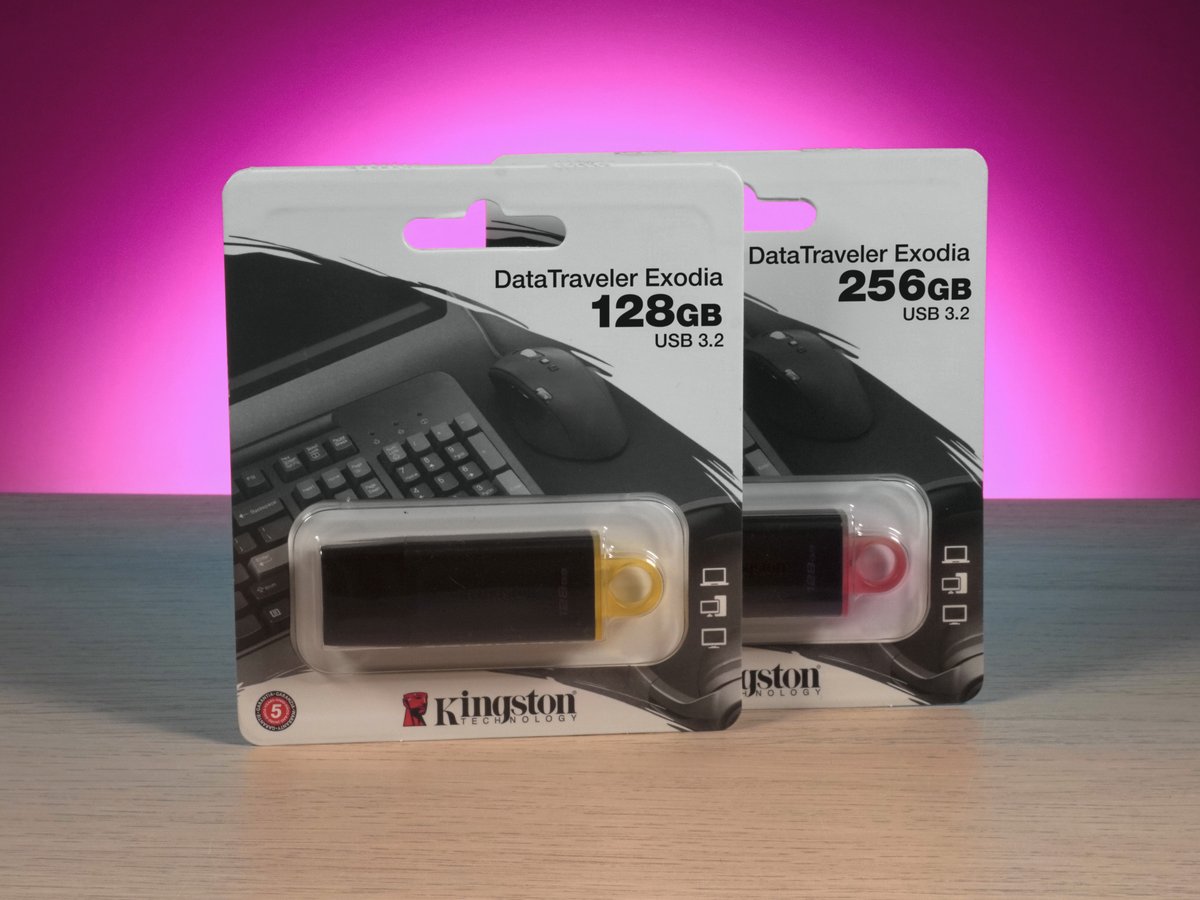
Kingston DataTraveler Exodia. USB 3.2 Gen 1 flash drives with read speeds up to 100MB/s. That’s roughly 10 times faster than an old USB 2.0 drive. Available in 128GB and 256GB capacities. Sliding cap design so there’s no loose cap to lose. Kingston is one of the most trusted names in memory products, and these drives come with a 5-year warranty.
We stock flash drives in different capacities depending on what’s available. 64GB, 128GB, and 256GB are the most common sizes. All our drives are USB 3.2 for fast transfers, and all are plug and play. No software to install, no formatting needed. Plug it into any computer and it works.
Stock changes regularly. Gee’z a shout on 01382 217272 if you need a specific capacity before you come in.
How Much Storage Do You Need?
Here’s a rough guide to what each capacity holds:
64GB holds roughly 15,000 photos, 15,000 songs, or hundreds of thousands of documents. The sweet spot for most folk. Enough for presentations, documents, music, and a good library of photos. If you’re buying one for general use, 64GB covers most situations comfortably.
128GB holds roughly 30,000 photos, 30,000 songs, or about 15 hours of HD video. Good for folk who move large files regularly. Design files, video projects, software installers, or carrying a big photo library. The Kingston Exodia 128GB is our most popular seller.
256GB holds roughly 60,000 photos or 30 hours of HD video. For folk who carry around video content, large design projects, or want to use the drive as a portable backup for their most important files. If you shoot video or work with large files, start here.
One thing worth knowing: a “128GB” drive actually has about 119GB of usable space. The file system and formatting take up about 7%. This is normal across all brands and all capacities. Buy one size bigger than your bare minimum to account for this.
If you need more than 256GB, a flash drive isn’t the right tool. An external hard drive or SSD gives you 500GB to 2TB in a package that’s still portable.
USB 3.2 vs USB 2.0: Speed Matters
The USB version on your flash drive determines how fast files transfer. The difference is dramatic.
USB 2.0 transfers at about 25 to 35MB per second in practice. A 5GB folder of photos takes about 3 minutes. An old USB 2.0 drive from the bottom of your drawer works, but it’s slow. If you’re transferring anything bigger than a few documents, you’ll be waiting.
USB 3.2 (which is what the Kingston Exodia uses) transfers at up to 100MB per second for reads. That same 5GB folder takes about 50 seconds instead of 3 minutes. For large files, the speed difference is the difference between grabbing a coffee and standing around waiting.
Important: your flash drive only runs at USB 3.2 speed if the port you plug it into also supports USB 3.0 or higher. A USB 3.2 drive plugged into an old USB 2.0 port will only run at USB 2.0 speed. You can tell which ports are USB 3.0+ by their colour: USB 3.0 ports are usually blue inside, USB 2.0 ports are usually black or white.
All the drives we stock are USB 3.2. If you’re still using an old USB 2.0 drive, upgrading is one of the easiest speed improvements you can make.
USB-A vs USB-C Flash Drives
Most desktop computers and older laptops have USB-A ports: the standard rectangular connector that’s been around for decades. The Kingston Exodia drives we stock use USB-A, which works with the vast majority of computers.
Newer laptops (MacBooks, Dell XPS, modern ThinkPads) may only have USB-C ports: the smaller, oval, reversible connector. If your laptop only has USB-C, you have two options:
- A USB-C flash drive (we stock these when available)
- A USB-A to USB-C adapter (cheap, small, solves the problem for any USB-A drive)
Some flash drives have both USB-A and USB-C connectors on the same stick. One plug on each end. Handy if you use multiple computers with different ports.
Not sure what ports your computer has? Bring it in and we’ll check in two seconds.
Flash Drive vs Cloud vs External Drive
Three ways to store and move files. Each has its place.
Flash drive: best for quick file transfers, carrying files in your pocket, printing documents at the library, handing files to someone physically. Cheap, portable, instant. No internet needed. Limited by capacity (max ~256GB for reasonable cost).
Cloud storage (Google Drive, OneDrive, iCloud): best for accessing files from anywhere, sharing with multiple people, and automatic syncing across devices. Requires internet. Monthly subscription for anything over the free tier. Uploading large files can take ages on slow connections.
External drive (HDD or SSD): best for large backups, mass storage, and fast transfers of big files. More capacity than a flash drive (up to 2TB+), faster than cloud. Bigger than a flash drive but still portable. See our external drive page for details.
For most folk, a flash drive handles the day-to-day “I need to move these files right now” situations. An external drive handles backups and large storage. Cloud handles syncing and remote access. They complement each other rather than replacing each other.
Why Buy In-Store
Flash drives are a “need it now” purchase. You’ve got files to move today, not tomorrow. Walk in, pick the size you need, and you’re sorted in two minutes. No waiting for delivery.
We can check what USB ports your computer has, recommend the right capacity for your needs, and format the drive if required. If you need a USB-C adapter to use the drive with a newer laptop, we stock those too.
If your computer’s own storage is the problem (full, failing, or slow), we can help with hardware upgrades and data recovery as well.
153 Perth Road, Monday to Friday 9:30 to 17:30, Saturday 10 to 17. Nae appointment needed.
Need a USB drive? Drap in tae 153 Perth Road. Grab one and go.
Call Us