

iMac Retina 4K 21.5″ A1418 (Late 2015) Repair Dundee
iMac Retina 4K 21.5" display flickering or showing artifacts? 4K iMacs pack a lot into a slim body, but we've got the experience to work on them confidently. Head to our Perth Road workshop in Dundee for a Full diagnostic, most repairs turned around the same day.
Google Reviews


About the iMac Retina 4K 21.5″ A1418 (Late 2015)
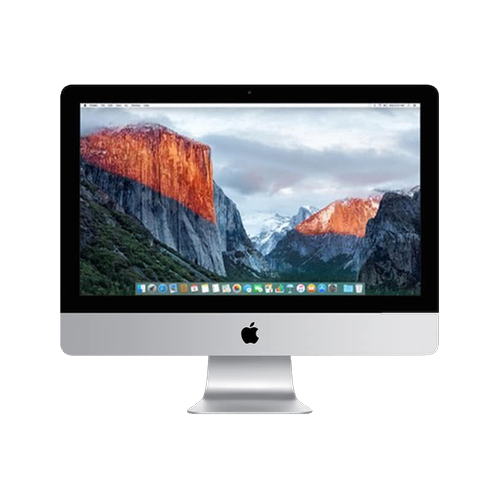
The iMac Retina 4K 21.5" A1418 (Late 2015) (A1418) was released in 2015 as the first Retina 4K 21.5-inch iMac with a 4096x2304 display. This brought Retina quality to the smaller iMac for the first time, with a gorgeous 4096x2304 display that made text and images incredibly sharp. It used Broadwell processors with Intel Iris Pro graphics. We repair every component at our Perth Road workshop in Dundee.
Common iMac Retina 4K 21.5" A1418 (Late 2015) repairs include 4K display panel failure (expensive replacement), hard drive or Fusion Drive issues, power supply faults, and thermal management problems. The 4K Retina display is costlier to replace than the standard 1080p panel but less expensive than the 27-inch 5K. RAM is soldered on this model, so SSD upgrades are the primary improvement we can make. Our technicians have over 20 years' combined experience with iMac repairs and handle everything from straightforward SSD upgrades to complex board-level diagnostics.
The iMac Retina 4K 21.5" A1418 (Late 2015). The first 4K iMac, a beautiful Retina display in the compact 21.5-inch form. If yours isnae working right, drap it in to our Perth Road workshop and we'll get it sorted. We ken whit we're daein wi' iMacs.
The iMac Retina 4K 21.5" A1418 (Late 2015) has soldered RAM, so memory cannot be upgraded after purchase. However, an SSD upgrade (replacing the mechanical hard drive or failed Fusion Drive) is the single best improvement you can make to this machine. Not sure which iMac you have? Check the model number (A1418) printed on the bottom of the stand, or go to Apple menu > About This Mac.
Model Numbers
You can find your iMac model number in Settings:
Device Specifications
iMac Retina 4K 21.5″ A1418 (Late 2015) Specs
Not Sure Which iMac You Have?
Dinnae worry - it's easy to check. Here's how to find your model number:
- Option 1: Click the Apple menu > About This Mac to see your model name and year.
- Option 2: Check the model number on the bottom of the stand or the rear of the display.
- Option 3: Just bring it in! We'll identify your exact model in seconds - nae bother at all.
Common iMac Retina 4K 21.5″ A1418 (Late 2015) Issues We Fix
Here are the issues we see most frequently at our Perth Road workshop:
Our technicians have over 20 years' combined experience. If it can be repaired, we'll fix it. If it cannae, we'll tell you straight - we'd rather give you honest advice than take your money for a repair that won't last.
Not sure what's wrong with your iMac Retina 4K 21.5″ A1418 (Late 2015)? Just bring it in and we'll diagnose the issue. Nae appointment needed.
Call UsiMac Retina 4K 21.5″ A1418 (Late 2015) Repairs
Select the issue you're having with your iMac Retina 4K 21.5″ A1418 (Late 2015). All repairs include a 90-day warranty and most are completed same day.
Not sure what's wrong? Select Diagnostic and we'll figure it out.
Same-Day Repairs Available
Select a repair above to book your drop-off time
Choose a RepairiMac Retina 4K 21.5″ A1418 (Late 2015) Repair Questions
How much does it cost to replace the screen on my iMac Retina 4K 21.5" A1418 (Late 2015)?
The iMac Retina 4K 21.5" A1418 (Late 2015) has a 4K Retina display, which is more expensive to replace than a standard 1080p panel but less costly than the 27-inch 5K models. Bring it in to our Perth Road workshop for a diagnostic and we'll give you an honest quote. Our technicians have over 20 years' combined experience with iMac display repairs.
Can you upgrade my iMac Retina 4K 21.5" A1418 (Late 2015) to an SSD?
Aye, absolutely - and it's the single best upgrade you can do for the iMac Retina 4K 21.5" A1418 (Late 2015). Replacing the mechanical hard drive or failed Fusion Drive with an SSD transforms the machine. Boot times drop from minutes to seconds, apps open instantly, and everything feels snappy again. It's the most popular repair we do on iMacs of this era. Drap it in to our Perth Road workshop and we'll get it sorted.
Can you upgrade the RAM in my iMac Retina 4K 21.5" A1418 (Late 2015)?
Unfortunately the iMac Retina 4K 21.5" A1418 (Late 2015) has its RAM soldered to the logic board, so it cannae be upgraded after purchase. The good news is that an SSD upgrade (if you're still on a mechanical drive) makes a far bigger difference to everyday performance than extra RAM would. Drap it in and we'll see what we can do to speed things up.
My iMac Retina 4K 21.5" A1418 (Late 2015) won't turn on - can you fix it?
Aye, no-power issues are one of the most common iMac problems we handle. On the iMac Retina 4K 21.5" A1418 (Late 2015), it's usually the internal power supply unit, which is a known weak point on Intel iMacs. Sometimes it's a blown capacitor, sometimes the whole PSU needs replacing. We can also check for logic board issues. Drap it in to our Perth Road workshop and we'll diagnose it properly - we ken these machines inside out.
How do I know if my iMac is the iMac Retina 4K 21.5" A1418 (Late 2015)?
The easiest way is to check the model number printed on the bottom of the stand - the iMac Retina 4K 21.5" A1418 (Late 2015) uses model number A1418. You can also click the Apple menu > About This Mac, which will show you the model identifier. If you're still not sure, just bring it in to our Perth Road workshop and we'll identify it for you in seconds - nae bother.
How long does an iMac Retina 4K 21.5" A1418 (Late 2015) repair usually take?
It depends on the repair. SSD upgrades and RAM installations can often be done the same day. Display replacements and board-level repairs take longer due to parts sourcing and the complexity of the work. We'll give you a realistic timeframe when you bring it in - we'd rather be honest about timing than make promises we cannae keep. Our Perth Road workshop handles every repair in-house.
4K iMac Not Working? We'll Fix That.
Walk-ins welcome. Most repairs done same day.