

iPad Pro 13″ (M4) Repair Dundee
iPad Pro 13" (M4) running slow or freezing up? The Tandem OLED display on this model needs specialist handling that most shops can't offer. Our Perth Road workshop in Dundee is open for walk-ins, Full diagnostics and fast turnaround on most repairs.
Google Reviews


About the iPad Pro 13″ (M4)
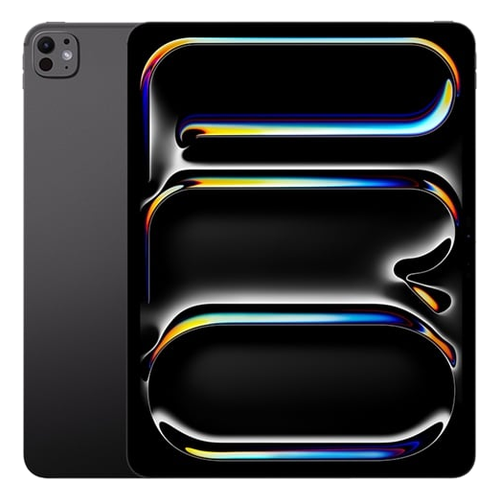
The iPad Pro 13" (M4) (A2925, A2926, A3007) was released in 2024 as the ultimate iPad with 13-inch tandem OLED and M4 chip. It features an 13-inch 2752x2064 Ultra Retina XDR tandem OLED ProMotion display powered by the Apple M4 chip. Apple's most advanced iPad ever, with a tandem OLED display delivering extraordinary HDR performance, M4 silicon, and an impossibly thin 5.1mm design. We repair every component at our Perth Road workshop in Dundee.
Common iPad Pro 13" (M4) repairs include cracked tandem OLED display (the most expensive iPad screen replacement), Thunderbolt port damage, Face ID issues, and battery degradation. The 13-inch tandem OLED is the single most expensive display panel Apple has put in any iPad. Combined with the ultra-thin design, repairs require expert handling. Our technicians have over 20 years' combined experience with iPad repairs and handle everything from straightforward screen replacements to complex board-level diagnostics.
The iPad Pro 13" (M4). The absolute pinnacle, tandem OLED, M4, and only 5.1mm thin. There's nothing else like it. If yours isnae working right, drap it in to our Perth Road workshop and we'll get it sorted. We ken whit we're daein wi' iPads.
The iPad Pro 13-inch (M4) ships as WiFi-only (A2925) and WiFi + Cellular (A2926, A2927). All share the same internal hardware and accept identical replacement parts. Not sure which iPad you have? Check the back of your device for the model number (e.g. A2925) printed in small text near the bottom.
Model Numbers
You can find your iPad model number in Settings:
Part Numbers
The iPad Pro 13″ (M4) was released in 2 colour options across 4 storage tiers:
| Colour | 256GB | 512GB | 1TB | 2TB |
|---|---|---|---|---|
| Space Black | MVX23NF/A | MVX43NF/A | MVX63NF/A | MVX83NF/A |
| Silver | MVX33NF/A | MVX53NF/A | MVX73NF/A | MVX93NF/A |
Device Specifications
iPad Pro 13″ (M4) Specs
Not Sure Which iPad You Have?
Dinnae worry - it's easy to check. Here's how to find your model number:
- Option 1: Check the back of your device for the model number (e.g. A1234) printed in small text.
- Option 2: Go to Settings > General > About and look for "Model Number".
- Option 3: Just bring it in! We'll identify your exact model in seconds - nae bother at all.
Common iPad Pro 13″ (M4) Issues We Fix
Here are the issues we see most frequently at our Perth Road workshop:
Our technicians have over 20 years' combined experience. If it can be repaired, we'll fix it. If it cannae, we'll tell you straight - we'd rather give you honest advice than take your money for a repair that won't last.
Not sure what's wrong with your iPad Pro 13″ (M4)? Just bring it in and we'll diagnose the issue. Nae appointment needed.
Call UsiPad Pro 13″ (M4) Repairs
Select the issue you're having with your iPad Pro 13″ (M4). All repairs include a 90-day warranty and most are completed same day.
Not sure what's wrong? Select Diagnostic and we'll figure it out.
Same-Day Repairs Available
Select a repair above to book your drop-off time
Choose a RepairiPad Pro 13″ (M4) Repair Questions
How much does it cost to fix a cracked iPad Pro 13" (M4) screen?
The iPad Pro 13" (M4) uses a tandem OLED display, which is one of the most expensive iPad screens to replace. We'll need to take a look at your device first to give you an accurate quote - just drap it in to our Perth Road workshop or gee'z a ring and we'll talk you through it. Every repair gets a full diagnostic so we ken exactly what's needed.
How do I know if my iPad Pro 13" (M4) battery needs replacing?
If your iPad Pro 13" (M4) is draining faster than it used to, shutting down unexpectedly, or the back is starting to bulge slightly, the battery likely needs replacing. iPads dinnae show battery health percentage like iPhones do, but we can run a diagnostic at our Perth Road workshop to check the cycle count and capacity. Nae obligation - just drap it in.
My iPad Pro 13" (M4) USB-C port feels loose - can you fix that?
Aye, USB-C ports can develop issues from regular use - loose connections, intermittent charging, or data transfer problems. We can replace the USB-C port assembly at our Perth Road workshop. Our technicians have over 20 years' combined experience and we'll make sure your iPad Pro 13" (M4) charges reliably again. Just drap it in or gee'z a ring.
Can you fix Face ID on my iPad Pro 13" (M4)?
Face ID on the iPad Pro 13" (M4) uses Apple's TrueDepth camera system, which is paired to the logic board at the factory. If the sensor itself is damaged, Face ID cannae be restored by any third-party repair - that's an Apple limitation, not ours. However, if Face ID stopped working after a screen repair elsewhere, we can often diagnose and resolve the issue. Bring it in and we'll tell you straight what's possible.
How do I know if my iPad is an iPad Pro 13" (M4)?
The easiest way is to check the back of your iPad for the model number - it's printed in small text near the bottom. The iPad Pro 13" (M4) uses model numbers A2925, A2926, A3007. You can also go to Settings > General > About and look for the Model Number field. If you're still not sure, just bring it in to our Perth Road workshop and we'll identify it for you in seconds - nae bother.
How long does a iPad Pro 13" (M4) repair usually take?
It depends on the repair. Some fixes like battery replacements can be turned around fairly quickly, while display replacements on the iPad Pro 13" (M4) take longer due to the complexity of the screen technology. We'll give you a realistic timeframe when you bring it in - we'd rather be honest about timing than make promises we cannae keep. Our Perth Road workshop handles every repair in-house.
M4 iPad Pro 13-Inch Damaged? We're On It.
Walk-ins welcome. Most repairs done same day.