

Mac mini A1283 (Early 2009) Repair Dundee
Mac mini running slow or not powering on? The 2009 A1283 commonly suffers from hard drive failure and needs an SSD upgrade. Bring it to our Perth Road workshop in Dundee for expert repair with over 20 years' combined experience.
Google Reviews


About the Mac mini A1283 (Early 2009)
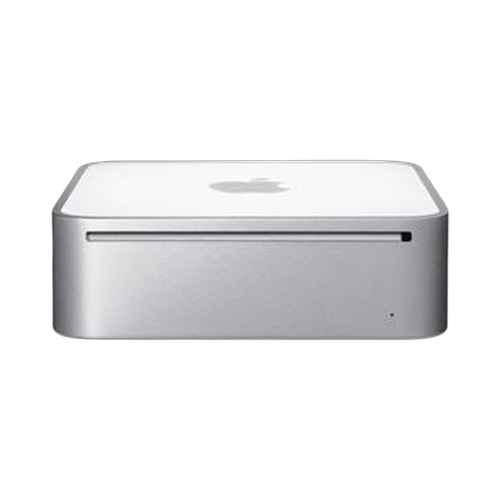
The Mac mini A1283 (Early 2009) brought Intel Core 2 Duo performance into the most compact Mac desktop Apple had ever built. With model number A1283, it packed a 2.0GHz processor, 1GB of DDR3 RAM, and a 120GB hard drive into that iconic aluminium unibody. Despite its age, plenty of these wee machines are still in use across Dundee homes and offices. Common problems include failing hard drives, sluggish performance from the original 1GB of RAM, and power supply failures. We handle all of these at our Perth Road workshop.
The Early 2009 Mac mini is one of the most repairable models Apple ever made. The RAM is user-upgradeable up to 4GB, and the hard drive can be swapped for an SSD to give this machine a genuine second life. Our technicians have over 20 years' combined experience working on Mac hardware, and we have repaired hundreds of these A1283 units. If your Mac mini will not power on, runs slowly, or makes clicking noises from the hard drive, bring it to us and we will get it sorted.
The Early 2009 Mac mini is a proper wee workhorse. An SSD and RAM upgrade transforms it completely. Drap it into our Perth Road workshop and we'll breathe new life into it.
This Early 2009 model (A1283) uses the older Mini-DVI and Mini DisplayPort connections. It was available in a single standard configuration at launch, with build-to-order options for a faster processor and larger hard drive.
Model Numbers
You can find your Mac Mini model number in Settings:
Device Specifications
Mac mini A1283 (Early 2009) Specs
Not Sure Which Mac Mini You Have?
Dinnae worry - it's easy to check. Here's how to find your model number:
- Option 1: Click the Apple menu > About This Mac to see your model name and year.
- Option 2: Check the model number on the bottom of the Mac mini.
- Option 3: Just bring it in! We'll identify your exact model in seconds - nae bother at all.
Common Mac mini A1283 (Early 2009) Issues We Fix
Here are the issues we see most frequently at our Perth Road workshop:
Our technicians have over 20 years' combined experience. If it can be repaired, we'll fix it. If it cannae, we'll tell you straight - we'd rather give you honest advice than take your money for a repair that won't last.
Not sure what's wrong with your Mac mini A1283 (Early 2009)? Just bring it in and we'll diagnose the issue. Nae appointment needed.
Call UsMac mini A1283 (Early 2009) Repairs
Select the issue you're having with your Mac mini A1283 (Early 2009). All repairs include a 90-day warranty and most are completed same day.
Not sure what's wrong? Select Diagnostic and we'll figure it out.
Same-Day Repairs Available
Select a repair above to book your drop-off time
Choose a RepairMac mini A1283 (Early 2009) Repair Questions
Can you upgrade the RAM in my Early 2009 Mac mini?
Aye, the Early 2009 Mac mini supports up to 4GB of DDR3 RAM. The upgrade is straightforward and makes a noticeable difference. Drap it in and we'll sort it.
My Mac mini A1283 will not turn on. Can you fix it?
No power is a common issue with these older Mac minis. It is usually the power supply or a logic board fault. Bring it in to our Perth Road workshop and we'll run a diagnostic to find out exactly what is wrong.
Is it worth repairing a 2009 Mac mini?
It depends on what you use it for. With an SSD and RAM upgrade, these machines still handle web browsing, email, and office work just fine. We'll give you an honest assessment of whether the repair makes sense.
Can you fit an SSD in my Early 2009 Mac mini?
Aye, we can swap the old hard drive for an SSD. It is one of the best upgrades you can do. The boot time drops from minutes to seconds. Gee'z a ring and we'll get you booked in.
My Mac mini is making a clicking noise. What is wrong?
That clicking usually means the hard drive is failing. Best to get it looked at sooner rather than later to avoid data loss. Bring it in and we'll confirm the diagnosis and discuss your options.
How long does a Mac mini repair take?
Most Mac mini repairs take 1 to 3 working days depending on parts availability. SSD and RAM upgrades are usually same day or next day. We'll give you a clear timeline when you drap it in.
Wee 2009 Mac mini Playing Up? We'll Get It Sorted.
Walk-ins welcome. Most repairs done same day.