

MacBook Battery Replacement Dundee
MacBook battery draining fast? Only lasting an hour? Swelling up? A battery replacement can give your MacBook another few years of life for a fraction of the cost of a new one. We replace batteries on all MacBook models at our Perth Road workshop.
 Google Reviews


Did you know that Apple MacBook, MacBook Air and MacBook Pro batteries typically last two to three years before showing significant degradation, affecting over 60% of users in Dundee who rely on them for work and study? If your MacBook now barely holds a charge or you find it shutting down unexpectedly, you’re not alone in experiencing this frustrating decline in performance.
At Repair Alliance Dundee, we understand how essential your MacBook is to your daily routine. Whether you’re a student at Dundee or Abertay University or Dundee and Angus College cramming for exams, a creative professional using it for work, or a business owner using your MacBook Pro to manage operations, a failing battery can disrupt everything.
Repair Alliance is owned and run by local people with over twenty years of experience in the computer repair business in the Dundee area. That’s why you can be sure that we know our MacBooks!
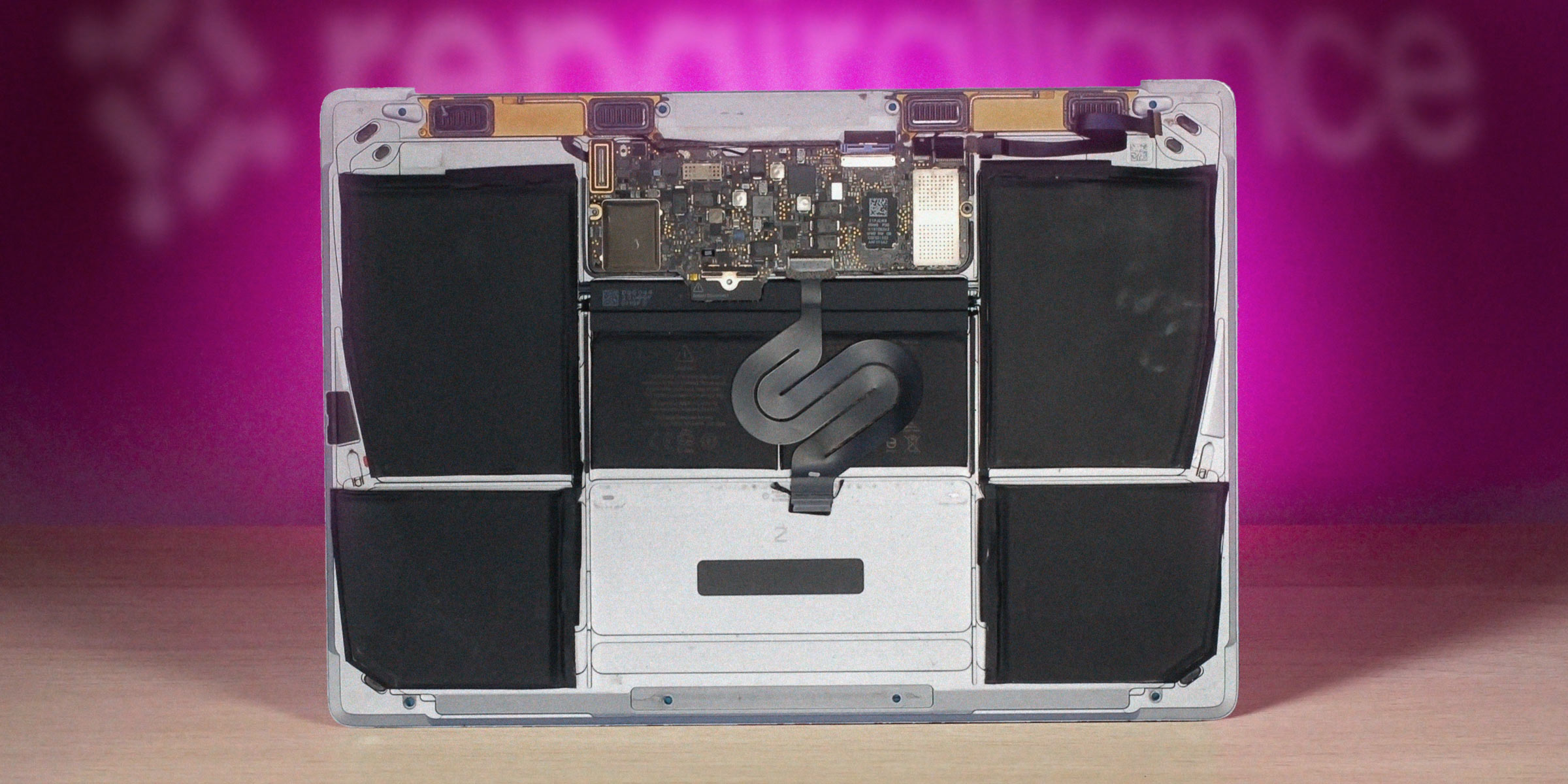
Our expert technicians provide professional MacBook battery replacement services right here in Dundee, using high-quality components and offering comprehensive warranties on all repairs. Located at 153 Perth Rd in Dundee’s West End, we’re conveniently positioned to serve customers throughout Angus, Tayside and North-East Fife with a fast, reliable service that gets your MacBook back to full power.
Within this page, we’ll go over the warning signs of battery failure, explain our battery replacement process, cover repair costs and timeframes… and we’ll explain why choosing local MacBook expertise makes all the difference for your computer’s longevity!
Signs Your MacBook Battery Needs Replacement in Dundee
Recognising when your MacBook battery is failing can save you from those awkward moments- such as when your laptop dies during an important presentation or while you’re working to a deadline. Here are some things to look out for.
Battery Health Indicators in MacOS
Your MacBook, MacBook Air or MacBook Pro actually tells you when something’s wrong- you just need to know where to look.
On newer MacBooks, click Apple menu > About This Mac > More Info > System Report, then select Power from the sidebar. You’ll see your battery’s condition status and cycle count.
Alternatively, if you’re running MacOS Big Sur or later, go to System Preferences > Battery > Battery Health (or System Settings > Battery on MacOS Ventura and newer). This shows your battery’s maximum capacity compared to when it was new.
If you’re seeing “Service Recommended” or your maximum capacity has dropped below 80%, that’s your MacBook telling you it’s time for a replacement. You can also check your cycle count here- most MacBook batteries are designed for around 1000 cycles before they start degrading noticeably.
There’s one other thing though- even if your cycle count looks fine, age matters too. A three-year-old battery that’s barely been used might still struggle to hold a proper charge.
Physical Warning Signs
One obvious sign of battery degradation is if your MacBook used to last all day at the library and now needs charging (say) every couple of hours. If you’re a student at Abertay Uni- or anywhere else- and you’re constantly hunting for power sockets, that’s a red flag.
Watch out for unexpected shutdowns too. One minute you’re working, the next your MacBook’s gone dark even though the battery showed 30% charge. That’s your battery playing tricks on you.
Overheating is another warning sign. If your MacBook’s getting uncomfortably hot during normal tasks like browsing or typing up documents, the battery might be working overtime to maintain power.
Swollen MacBook Battery
The most serious- and obvious warning- is a swollen battery. If your MacBook’s trackpad feels raised or the bottom case isn’t sitting flat anymore, that’s down to a swollen battery forcing it out- stop using your MacBook immediately and bring it straight to us. A swollen battery isn’t just inconvenient- it’s dangerous.
Battery on its last legs? Drap it in for a free battery health check. Nae appointment needed.
Call UsPerformance Impact- Failing MacBook Batteries mean Slower Performance
Many people don’t realise that a failing battery doesn’t just affect how long your MacBook runs- it actually slows down your entire system. Apple introduced something called thermal throttling, which deliberately reduces your processor speed when the battery can’t provide stable power.
So if your MacBook feels sluggish lately, especially during demanding tasks like video editing or running multiple applications, your battery might be the culprit. This can particularly affect creative professionals in Dundee who rely on their MacBooks for client work.
Now that you understand the warning signs, let’s explore our professional replacement process and show how we can get your MacBook back to peak performance.
Professional MacBook Battery Replacement Process
When you bring your MacBook to Repair Alliance Dundee, you’ll receive more than a new battery- you’ll get a proper professional service that’ll have it running like new again.
Initial Diagnostic Assessment
We start every battery replacement with a thorough evaluation to confirm that’s what’s actually needed. Sometimes what looks like a battery problem turns out to be something else entirely- maybe a rogue app that’s draining power or a charging port issue.
Our technicians will run a full diagnostic on your specific MacBook model, whether it’s a 2015 MacBook Air or the latest M2 MacBook Pro or anything else. Each model has different battery specifications and replacement procedures, so we make sure we’ve got the right approach before we start.
You’ll get a transparent cost estimate upfront- no nasty surprises when you come to collect your MacBook. We explain exactly what needs doing and why, so you can make an informed decision about proceeding with the repair.
Expert Installation Procedure
Here’s where our experience really shows. We source high-quality compatible batteries that meet or exceed the original manufacturer specifications. While replacement batteries are available to meet whatever you might want to pay, the cheap ones very much get there by cutting corners. We only use good-quality batteries that won’t fail six months later.
What makes our service different from Apple’s? We replace just the battery itself. When you go to Apple, they’ll replace the entire top case assembly. That means you get a new battery, but also a new keyboard, trackpad, and housing. Sounds great… until you see the bill.
We’ve got the skills and tools to replace just the battery component, which keeps your costs down significantly while still giving you the performance boost you need.
The replacement happens in our clean workshop environment using professional tools- the same grade equipment Apple’s own technicians use. Each installation includes removing the old battery safely (particularly important if it’s swollen), cleaning the battery compartment, and installing the new battery with the correct torque settings on all screws. Get this wrong and you could irreparably damage your MacBook’s logic board– a very expensive mistake to make.
An NHS worker’s MacBook Air battery was lasting 45 minutes instead of 10 hours. She was carrying her charger everywhere and constantly hunting for power sockets at work. We replaced it with a quality cell, ran full calibration, and she got back to full-day battery life. She said it was like getting a new laptop.
Post-Replacement Calibration
Once the new battery’s installed, we don’t simply hand your MacBook back. We’ll run a full calibration process to make sure the battery management system recognises the new component properly and that all power-related features are working as they should.
The whole process typically takes us between two and four hours depending on your MacBook model, though we usually recommend leaving it with us for the day to avoid rushing it.
MacBook Battery Replacement Costs in Dundee
There’s a good chance you’re reading this because you’re hoping we’ll be cheaper than booking your MacBook straight in with Apple. The good news is that we are typically a lot cheaper, so let’s go into detail.
MacBook battery replacement costs vary depending on which model you’ve got. The older models are generally cheaper to fix, while the newer “Apple Silicon” M1 and M2 MacBook Air and MacBook Pro models cost a bit more due to the different battery design and complexity.
Several factors affect the final price: your MacBook’s age, whether we need to remove additional components to access the battery, and whether there’s any corrosion or damage that needs addressing during the replacement. We’ll give you a clear quote once we’ve assessed your specific model.
Apple’s battery replacement service costs significantly more because they’re replacing that entire top case assembly we mentioned earlier. You’re looking at a much higher bill for what Apple calls a “battery service,” when all you actually need is the battery itself.
Our replacements come with a comprehensive warranty, so you’re covered if anything goes wrong. Compare that to DIY attempts where you could easily damage your logic board or other components– suddenly that cheap battery kit from eBay doesn’t seem like such a bargain.
The long-term cost benefits speak for themselves. A proper battery replacement can extend your MacBook’s useful life by two to three years, delaying the need for a complete replacement that could cost you well over £1000.
Battery dying on you? Gee’z a shout. Battery health check included with every replacement.
Call UsWhy Choose Repair Alliance Dundee for MacBook Battery Replacement?
When your MacBook’s letting you down, you want someone who knows what they’re doing- not just another repair shop that treats every electronic device or computer the same.
We’re owned and run by local people– people who have been in the repair business in Dundee for over twenty years. That’s why we understand our market so well and what local users in Dundee and the surrounding areas need from their MacBooks. Whether you’re a student trying to get through dissertation season without your laptop dying, a photographer working in the West End, or someone running a business from the city centre, we understand what you need.
If you want to hand your device to Apple themselves, the nearest Apple stores for owners in Dundee, Angus and north-east Fife are in Edinburgh and Glasgow, which will take much of your day just to drive there and back. And then there’s a good chance they’ll simply send it off to an Apple repair centre elsewhere.
Being right here on Perth Road in Dundee’s West End means you’re not posting your MacBook off somewhere or driving to Glasgow for a repair. You can drop it off on your way to work and collect it on your way home. That convenience matters when you rely on your MacBook every day.
Our technicians aren’t just general computer repair people who’ve watched a few YouTube videos. We’ve invested in the proper training and equipment specifically for MacBook repairs. We’ve got the specialised tools that are required- the correct spudgers, the right screwdriver bits, and microscope and microsoldering equipment sufficient for fine work.
Every battery replacement comes with our comprehensive warranty coverage. If there’s a problem with the battery or our workmanship, we’ll sort it out- no arguments, no excuses. We’re established in Dundee, we’re not going anywhere, and we stand behind our work.
Maintaining Your New MacBook Battery
Getting a new battery is just the start- looking after it properly means you won’t be back here again anytime soon.
Don’t leave your MacBook plugged in all the time. Modern MacBooks are pretty smart about managing charging, but constantly sitting at 100% charge isn’t ideal for long-term battery health. If you’re working from home and your MacBook’s always on the desk, unplug it occasionally and let it run down to around 20-30% before charging again.
Heat is your battery’s worst enemy. Don’t leave your MacBook in a hot car or sitting in direct sunlight. If you’re working outside in sunny weather, try to keep it in the shade. Similarly, don’t block the air vents- your MacBook needs to breathe.
Keep your software updated. Apple regularly releases battery management improvements in MacOS updates, so those annoying update notifications are actually helping your battery last longer. The same goes for keeping your apps updated- newer versions are often more power-efficient.
Close apps you’re not using, especially anything that’s constantly syncing or updating in the background. That includes browser tabs- Chrome is particularly notorious for draining batteries even when you’re not actively using it.
Keep an eye on your battery health through the System Settings we mentioned earlier. If your maximum capacity drops below 80% again, or you start seeing those “Service Recommended” messages, it’s time for another chat. Don’t wait until your battery’s completely dead before getting it looked at.